Configure FireSoft with ImaCash
The supplier must prepare ticket exports for the installed edition and confirm their format. Connector documentation does not validate every edition, cash device or physical installation.
1. Prepare the exchange
Reserve a folder for this installation only. The ImaCash Windows user needs exclusive read access and permission to create, move and delete files and subfolders. Check network-share access with that same user. Do not select personal documents, backups or a folder used by several readers.
2. Select FireSoft
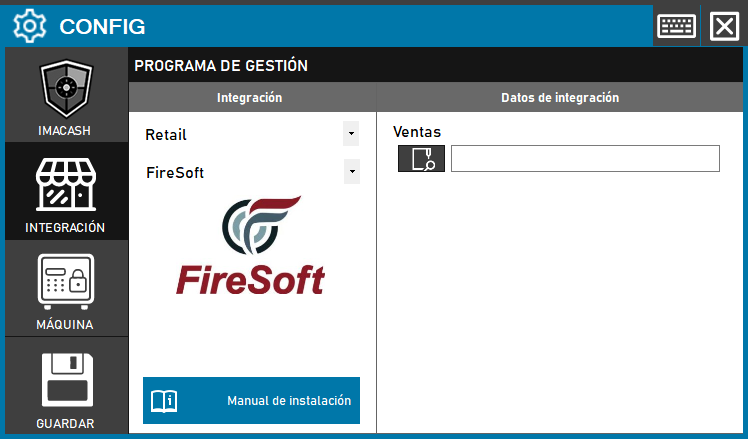
Open Settings > Integration, choose POS and select FireSoft. The historical screenshot shows Retail and an earlier Save button; these are not the current steps. Configure the cash device separately.
3. Set Sales
In Sales, select the exchange directory confirmed by the supplier, not an individual ticket. The connector has no SQL server, port or account fields of its own. Keep the path and network access details private.
4. Save when closing
Close Settings and confirm saving when prompted; follow the proposed restart if applicable. Startup only checks that the path is not empty: the indicator does not validate existence, permissions, format or payment.
5. Supply complete files
The reader checks files at the top level without restricting their extension. Keep unrelated files and temporary files elsewhere. The producer must finish each ticket before making it available; the minimum delay and exclusive access alone do not guarantee completeness. The format uses N Ticket, Fecha, Hora, Le Atendio and Contado or Tarjeta amounts, with colon-separated fields and payment variants agreed with the supplier. Confirm encoding, dates and decimal separator; do not copy real data into the guide.
6. Check amounts and archiving
The reader can obtain cash and card portions from one ticket using different references. Check amount, sign and the sum of portions against the original document: classification does not authorize or settle a bank payment. Incomplete tickets may remain pending; zero-amount tickets may be removed. A file in processed indicates local incorporation or review, not payment. The synchronization date cannot reconstruct tickets no longer in the folder.
7. Review scope
Compare the received seller with local filters. Terminal and shop use fixed internal values: they do not establish support for several tills or companies, or isolation between them. Terminal or seller catalogues, items, shifts and bank totals are not validated. Do not assume that other connectors’ filters or card options are available here.
8. Verify the outcome
Confirming or rejecting in ImaCash does not write a closure or cancellation to FireSoft, or generate a payment response from this connector. With the supplier, verify export, capture, amount and sign, the result in ImaCash and the device, and review in FireSoft, including supported split payments and refunds. If the outcome is uncertain, check both systems and actual cash before repeating, restoring files, changing references, resynchronizing or restarting. A guide or simulated test does not replace physical validation.