Set up ClassicGes through DBF files
This guide covers the DBF query connector selected as ClassicGes in ImaCash. The provider must confirm the edition, active folder and file structure. The TeamSystem | AIG corporate logo identifies the publisher; it does not validate all editions or cloud services.
You need 32-bit VFPOLEDB and stable access to the data folder under the Windows user running ImaCash, including when using a UNC path. Keep each DBF with its corresponding FPT when used; do not mix files from different backups or times.
Setup steps
- Ask the provider to prepare VFPOLEDB x86 and confirm the active files and permissions needed to query them. Do not select a backup or old folder merely because its name matches.
- Open Configuration > Integration > POS and select ClassicGes. Configure the cash device connection separately under Machine.
- Select the installation files
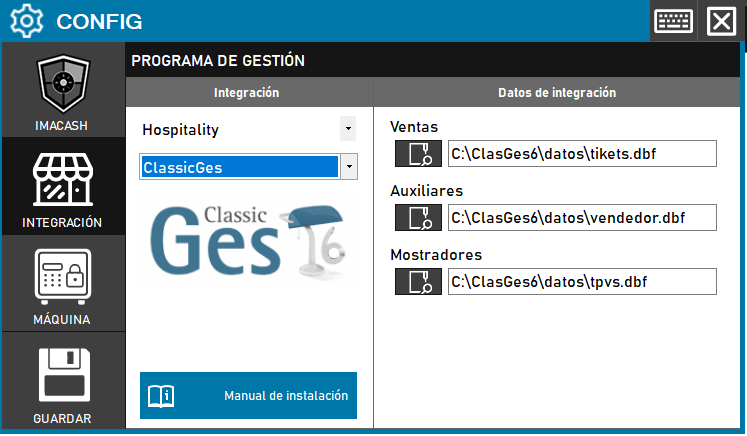
- Sales: Select the active tikets.dbf file, using the name and location confirmed by the provider.
- Invoices: Select factura.dbf when paid invoices will be queried. If the field is empty, that file is sought next to the sales file and loaded only if present. Leaving the field empty does not disable a file found there.
- Auxiliaries: Select vendedor.dbf to query operators.
- Counters: Select tpvs.dbf to query counters and their shops.
- Close the changed configuration and choose to save. Review the result and accept a proposed restart only when appropriate. Opening the files does not prove complete capture or successful device operation.
- With the provider, check each authorized workflow under supervision: document, reference, date and time, amount, sign, cash, card, operator, counter and shop. Compare both programs and actual cash.
Scope and limits
Queries tickets marked as paid and, when the file is available, paid invoices accepted by the exchange. A document marked as paid in ClassicGes does not itself prove a cash movement in the device.
Can separate the card and cash portions of reported mixed-payment tickets. Invoice processing depends on the payment method and linked ticket information. Check general card settings and validate each mode; reading a card portion does not confirm a bank payment.
Queries operators, counters and shops for available filters. Check each capture and pending transaction filter using actual values. Changing the synchronization date does not guarantee complete history or freedom from duplicates: review already captured transactions first.
Does not write confirmations or cancellations to ClassicGes. Cancelling in ImaCash does not prove a cancellation at the source or returned cash. If the result is uncertain, check the transaction in both programs and actual cash before repeating, resynchronizing or restarting.
Does not import products or shifts or provide a bank card total. This guide, the connection and the logo do not validate physical operation or universal compatibility.
Official TeamSystem | AIG website
The historical screenshot shows Hospitality, the ClassicGes 6 logo and a Save button, without an Invoices field. The current selection is POS > ClassicGes, includes Invoices and saves on closing. Its paths are examples from that screen, not confirmed installation paths or validation of other editions.