Set up Accees in ImaCash
This page covers the Accees option in ImaCash for a compatible installation supplied by ACCEES. It reads documents from a database file. It does not establish compatibility with every application, version or device from the manufacturer, or with any Microsoft Access file.
Installation requirements
Ask the provider to confirm the active file and its compatible structure. The connector uses 32-bit Microsoft Jet OLEDB 4.0; an ACCDB file or installing ACE alone does not meet that requirement. Setup has no database password field: an encrypted or protected database requires provider review.
Setup steps
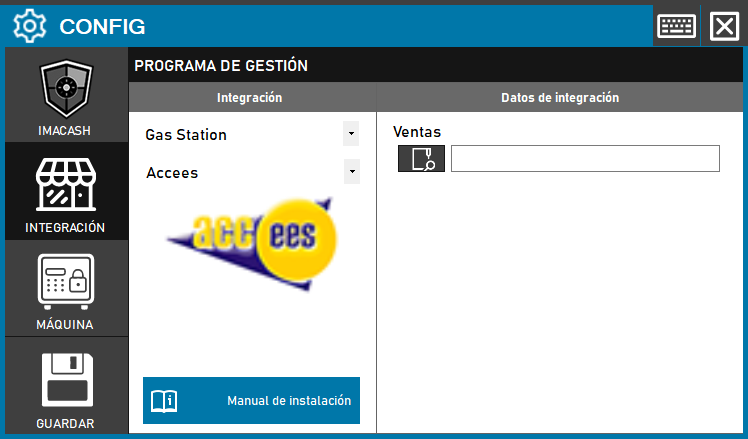
- In ImaCash, open Configuration and go to Integration.
- Select POS and then Accees. If it is missing, confirm the installed version with support; do not choose another integration just because it uses an Access database.
- Under Transactions, use the file picker to select the specific file confirmed by the provider. Enter the full file path, not just its folder. Do not invent a filename or select an old copy.
- Check that the Windows account running ImaCash can access the file and has the folder permissions Jet needs for shared locking. For a network location, also confirm access under that same account. Do not grant broad permissions or use an unrelated database.
- Save the changes and check integration status. Successfully opening the file does not establish that all sales are represented.
Cash, discounts and cards
The connection groups the data it reads by document and date and calculates the amount after discounts. It presents these movements as cash, without a card, credit or other payment breakdown. Enabling or disabling card acceptance does not reclassify this read flow. Ask the provider to confirm that the source contains only movements to be treated as cash; if this cannot be guaranteed, do not consider capture validated or use it for automatic cash payments.
Workstations, salespeople and filters
This connector does not obtain a list of real workstations, salespeople, shops or drawers. Its workstation, salesperson and shop references are generic. Do not treat filters as proof of separation by employee or till: check them against known documents, as they can exclude movements.
Check the results
With the provider, compare existing documents: reference, date, net amount and discounts. Review cash, card, mixed payments and refunds according to the actual scope of the file. Also check for missing or duplicate movements during synchronisation. Do not perform real payments or refunds to test setup.
The connection reads data; it does not import products or write confirmations or rejections to the POS. It does not establish document closure, a bank payment or reconciliation. Connection and documentation do not validate a physical cash machine or the entire installation.
The screenshot shows an earlier interface without installation data. Ventas is the file field shown as Transactions in the current configuration.