

Set up Teledom Logidom RSA in ImaCash
Ask the provider to prepare and confirm the exchange for this installation. Use a dedicated private folder: the Windows account running ImaCash needs to read and delete incoming TXT files and write responses. Do not select an archive folder or documents you need to keep.
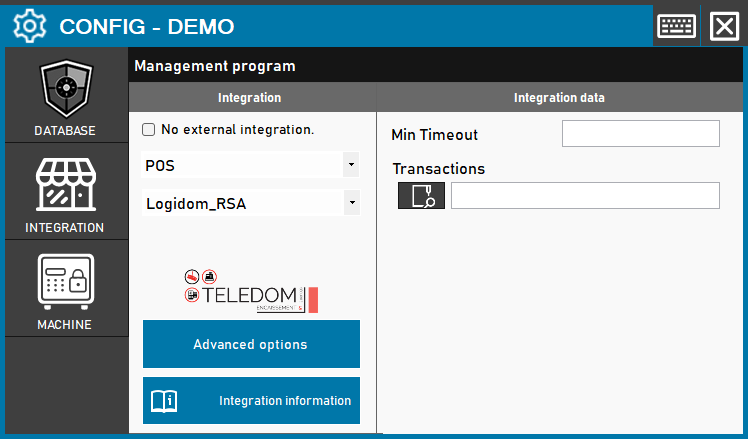
- From the main window, open Configuration > Integration with the required configuration permission. Select POS > Logidom_RSA. The historical Teledom guide and this selector name refer to the same profile.
- Under Transactions, select the exchange folder confirmed by the administrator. Min Timeout takes whole minutes for the payment window's timed close request; it is neither milliseconds nor a terminal count. Zero disables that countdown. Agree a suitable value with support: expiry requests the usual close procedure and does not guarantee cancellation or a cash return. This profile requires no SQL, server or password fields.
- Close Configuration with X. If changes are pending, choose to save, keep editing or leave without saving. Reopen to check the profile. Discarding does not undo stages already saved. Saving or showing a connection does not prove that the folder, files and responses work correctly.
Reading sales and scope
ImaCash looks for TXT files in the folder. The exchange contains amount, terminal, sale reference, operator, date and payment type. Files are deleted after reading, before validation finishes: an incomplete or unsupported file can disappear without becoming a sale. The provider must check the generated format, size, dates and amounts.
The reader does not apply the resynchronisation date or its own terminal, operator or shop filters. Resynchronising does not recover consumed TXT files or guarantee a complete history. Type 1 is accepted as cash; other types depend on Accept cards payments and ImaCash processing. They do not prove bank authorisation, a complete mixed payment or that the ticket is still unpaid in the POS.
Responses and checking the result
When confirming a sale, ImaCash attempts to write an empty file named with the reference and .OK extension; a confirmed cancellation uses .KO. Rejecting separately writes no response. Creating the file does not prove that Logidom received it or closed the ticket; confirm reference handling, response consumption and terminal separation with the provider.
Before use, review a supervised exchange of sales, refunds and responses with the provider and support. If a sale is missing or the result is uncertain, check the same ticket, its ImaCash record and actual cash before resending files, repeating payment or resynchronising. This guide does not certify commercial versions or physical validation.