
ImaCash integration

Pharmagest

The Pharmagest configuration with ImaCash, allows you to connect your cash control machines to your POS for complete traceability

Pharmagest
Pharmacy

To integrate Pharmagest Software with ImaCash, the technician will need to select the specific communication folder used by the Pharmagest system for data exchange.

Steps to follow

  1. CONFIG → INTEGRATION in ImaCash.
  2. Management Program:
    • Category: Pharmacy.
    • Integration: Pharmagest.
  3. Integration data:
    • Sales: Click the folder icon to select the Pharmagest communication folder path.
  4. Save: Click the SAVE button (floppy disk icon).
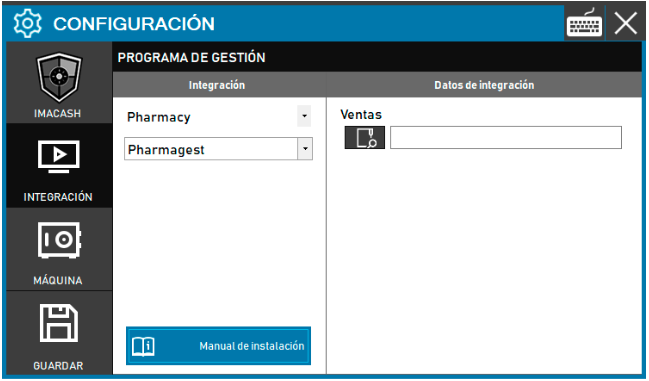
Pharmagest configuration screenshots

Integration ready to move forward

If this integration matches your software, the next step is moving into real operation

We can help you validate the scope, confirm compatible hardware and prepare the next implementation step.