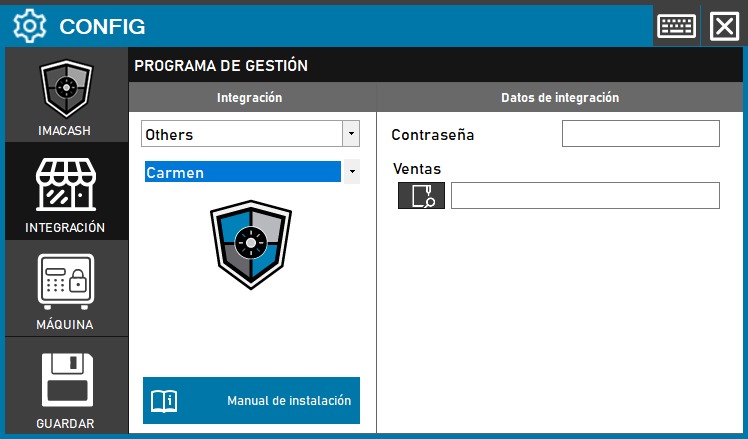
Configure Carmen
This guide covers the ImaCash Carmen connector that reads an Access database. Confirm the edition and installation file with the provider; it does not certify all Carmen WKS versions or operating modes.
The computer needs Microsoft.ACE.OLEDB.12.0 with the same architecture as ImaCash: 32-bit for the x86 distribution. The actual Windows user must be able to read the file and create any Access lock files in its folder. No DSN or SQL Server connection is used.
Setup steps
- Ask the provider for the exact Access file and its private file password if protected. Confirm access from the ImaCash computer and the required permissions; do not guess file names or use an old copy as the live source.
- Open Configuration > Integration > POS and select Carmen.
- In Sales, choose the confirmed database file with the file picker. This is not a folder or a text sales file. Password holds the private password of that file, not the Carmen or Windows login. Do not publish these details in screenshots.
- In the payment method dialogs, choose the actual, distinct cash and card descriptions from Carmen. Also review Accept cards. This selection applies to tickets; advance payments have the specific handling described below.
- Close the changed configuration and choose to save. Review file opening and the payment method and filter dialogs; explicitly confirm a proposed restart when appropriate. Saving without changes may retain the previous check.
- With the provider, validate a controlled ticket: reference, amount including cents, date and time, terminal, salesperson, payment method and actual cash. Check advance payments and negative amounts separately. Opening the file or saving does not validate the whole physical workflow.
Scope and checks
Reads tickets with their total amount, date and time, terminal and salesperson. Classifies each ticket using the selected cash or card method; it does not universally split mixed payments or prove bank reconciliation.
Advance payments are read separately and recognise the literal payment names efectivo and tarjeta. They do not use the ticket payment selection or supply a salesperson; their date does not retain an operation time. Confirm their meaning with the provider and do not automatically add tickets and advances as separate sales.
Reads terminals and salespeople. In the connector queries, the terminal limits tickets and advances, while the salesperson limits tickets only. ImaCash then applies local filters to capture and pending transactions: an advance without a salesperson may be excluded by an active salesperson filter. Also review till or shop filters when those details are not supplied, and validate each workflow with its active options. Terminal identifies the Carmen till, not the cash machine. Reading from a date does not guarantee a complete history without duplicates.
Local confirmation or cancellation in ImaCash does not write a result or cancel the sale in Carmen. It does not prove a cash refund either. If the outcome is uncertain, check the source, local status and actual cash before repeating, resynchronising or restarting.
Does not import products or shifts or provide a bank total for cards. Refunds, mixed payments, additional editions and physical use need specific provider validation before use.
Official Carmen website at GR Soft
The historical screenshot shows empty fields, the Others category and the Save button of an earlier interface. The current selection is POS > Carmen and saving happens on closing. The ImaCash symbol in that screenshot is our brand, not the Carmen logo.