

Set up SCHULTES file exchange
SchultesFicheros reads sales files the POS leaves in an exchange folder. Ask your provider to confirm that your installation uses this exchange.
Ask the administrator for the private folder. The Windows account running ImaCash must be able to read and archive files and write responses. Use a folder reserved for this exchange.
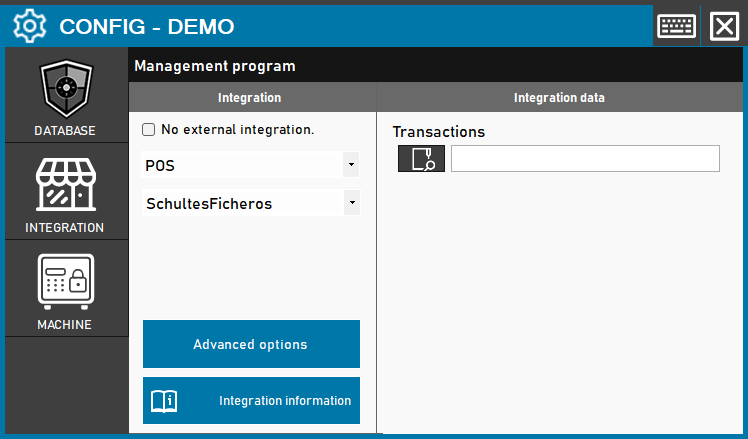
- From the main screen, open Config → Integration with an authorised user. Under Management program, select POS and SchultesFicheros.
- Under Transactions, select the folder icon and choose the agreed private location. This profile has no database connection fields.
- Close Config, accept the save prompt if shown, and reopen it to check the folder. Saving does not establish that the POS sends files or receives responses.
What is received
The reader receives TXT files with the sales reference and details. When card payments are disabled, it does not import other identified payment methods. Resynchronising does not recover archived files.
How to check the result
Compare the reference, amount and status in both programs. ImaCash tries to write an .OK response with the recorded amounts or .KO if it confirms a cancellation. The POS can send a request through a .CANCEL file.
A response file does not by itself confirm closure in the POS, a cash refund or a bank payment. If the outcome is uncertain, check it before copying the file back or attempting another payment.