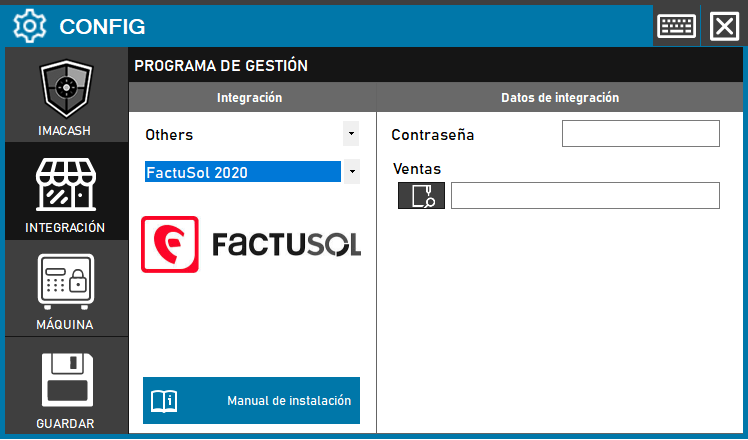
Set up FactuSol 2020 with ImaCash
TeamSystem Factusol is the current brand. FactuSol and FactuSol 2020 name two distinct ImaCash profiles; the year in the selector does not validate every later edition or cloud service. Ask the provider to confirm your installation’s edition and format. Configure the cash machine separately.
1. Prepare the Access file
The administrator must identify the active Access file for the correct company and financial year, accessible under the actual ImaCash Windows user. You need the Microsoft.ACE.OLEDB.12.0 provider with an architecture compatible with the installed application. The provider prepares access and sharing permissions, including any lock files Access may require. Do not use an old copy or assume that read-only file permission is sufficient.
2. Select the profile and complete Sales
Open Configuration > Integration and choose POS. In Sales, use the file picker to enter the full private path of the active database confirmed by the administrator. This is not an exchange folder, a DSN or a SQL connection using server, port and user.
Select FactuSol 2020. After checking the connection, the wizard asks for actual cash and card methods. Choose distinct exact names from your database list; other methods are not captured. The FactuSol profile has a separate guide.
Access to protected files
Both profiles show Password, but their current connection does not use this field to open Access. Filling it in does not prove that a protected database can be opened. If the file requires a password, first confirm a supported method with support and the provider; retain protection and do not create unprotected copies to bypass it.
3. Save when closing
Close Configuration and confirm saving when prompted; follow any proposed restart when applicable. The check opens and closes Access, but does not validate the whole structure, complete reading or a payment. An empty list does not prove that no payments are pending.
4. Which payments are read
It reads payment records with a nonzero amount whose method exactly matches configured cash or card. It starts at midnight on the selected day, without applying the exact time even if synchronization shows it. Reading a card line does not validate bank authorization or the separation of a mixed payment.
5. Limit the terminals
Open Configuration > Filters and configure the POS/counter filter with the allowed terminals. Filters run after reading. The terminal description is used, falling back to its code; it can be empty. With an active POS filter and a configured selection, a payment without a match is excluded. This flow has no reliable company or seller identification; check terminal isolation with the provider.
Confirmations and limits
Confirming or rejecting in ImaCash does not write a payment closure or cancellation in Factusol. Items, shifts and bank totals have no validated scope. Do not assume mixed payments, bank authorization, complete historical recovery or absence of duplicates.
6. Verify before commercial use
Arrange a supervised test with the provider comparing document reference and date, amount, sign, currency, terminal and outcome in Factusol, ImaCash and the machine. For FactuSol 2020, check both allowed and excluded terminals. If the outcome is uncertain, review both systems and actual cash with support before repeating, resynchronizing or restarting; do not change references or dates to repeat payments. This documentation review does not validate physical operation.