Configure Bimedia with ImaCash
The Bimedia connector exchanges requests and responses through files. Confirm the folder and workstation setup with the provider; this is a file-based connection.
Use a dedicated exchange folder accessible to the actual Windows users running Bimedia and ImaCash. They must be able to read, create, write and manage their respective files. Do not select documents, backups or folders used by other processes.
Configuration steps
- Ask the provider to prepare the Bimedia exchange and confirm the folder, the amount format in cents and how it recognises the result. An empty folder alone does not prepare the integration.
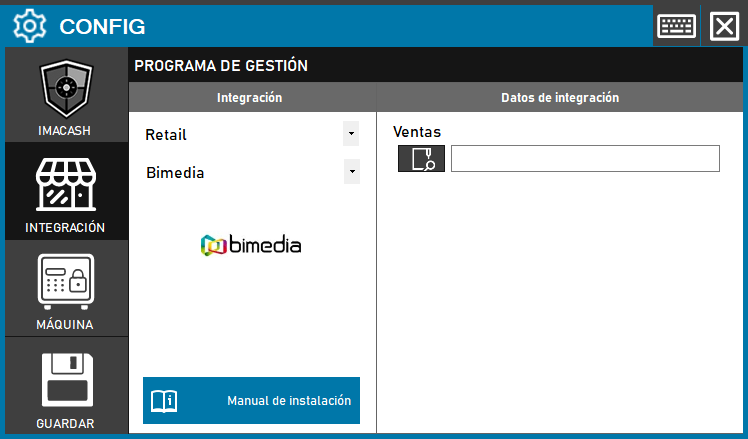
- In ImaCash open Configuration > Integration, select the POS category and then Bimedia.
- In Sales use the folder picker to enter the confirmed exchange path. This profile does not ask for a server, port, SQL user or password in ImaCash; the administrator supplies private environment details.
- When closing the configuration with changes, choose to save and review the displayed result. If a restart is offered to apply the changes, confirm it explicitly when appropriate. Accepting a path does not prove file access or a correct cash transaction.
- Before live use, carry out a supervised test with the provider: check the reference, amount including cents, cash actually accepted or returned and response recognised by Bimedia. Also confirm the cancellation and refund process supported by the installation.
Scope and checks
The connector presents the received amount as cash. It does not provide a card or mixed-payment breakdown, product catalogue, sales staff or shifts. The date comes from the received file and is not necessarily the original receipt date.
It does not discover actual stores or terminals: it uses a generic workstation and receives no salesperson. Review local filters so requests are not excluded; changing the synchronisation date alone does not retrieve a Bimedia sales history.
ImaCash generates a response after processing. Creating it or acknowledging a cancellation does not prove that Bimedia has applied it or that cash has been returned. If the outcome is uncertain, review both programs and actual cash with support before repeating, deleting files or restarting.
Configuration and file reading do not certify physical validation or compatibility with every version, model or feature. The provider must confirm the environment and supported operations.
Bimedia on the official Orisha website
Historical visual reference in Spanish: the screenshot below shows Retail and the former Save button, with Sales empty. In the current interface, follow the POS path and save-on-close procedure described above.