


SirTPV Configuration
To integrate SirTPV Software with ImaCash, the technician will need to link the terminal database file and provide the document encryption credentials.
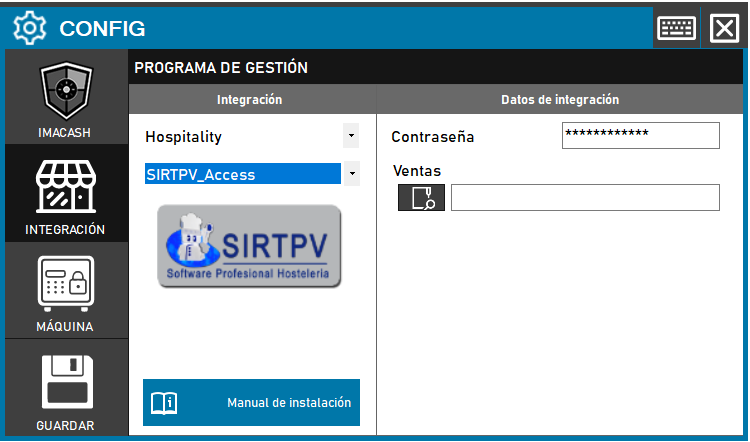
Steps to follow:
CONFIG → INTEGRATION in ImaCash.
Management Program:
Category: Hospitality.
Integration: SirTPV.
Integration data:
Database: Click on the search icon to open the dialog box and select the “*.mdb” file that contains the SirTPV database.
Contraseña: Private information provided by the administrator. Enter it only in ImaCash.
Save: Click the SAVE button (floppy disk icon).
SIRTPV SQL
For the integration of the SIRTPV SQL Software, the technician must configure the connection parameters to the server where the SQL database of the management program is hosted.
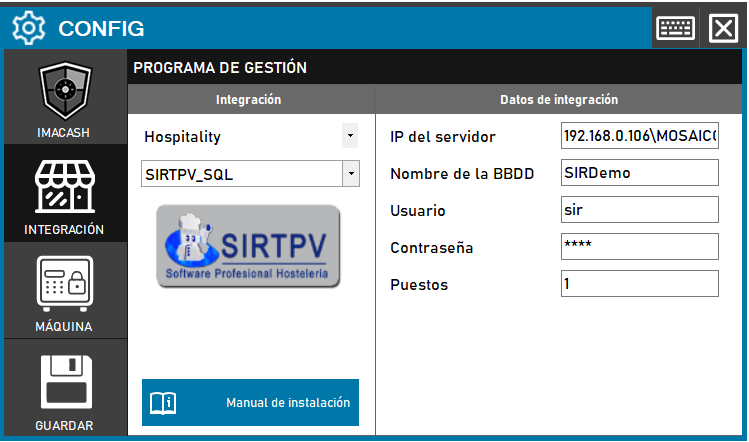
Steps to follow:
CONFIG → INTEGRATION in ImaCash.
Management Program:
Category: Hospitality.
Integration: SIRTPV_SQL.
Integration data:
Server IP: Enter the network address of the server SQL.
Database name: Enter the name of the database (e.g. SIRDemo).
User: Enter the access user name (e.g. sir).
Contraseña: Private information provided by the administrator. Enter it only in ImaCash.
Positions: Specify the number of linked terminals or positions.
Save: Click the SAVE button (floppy disk icon).