

When I set up ImaCash with a CashKeeper machine, I start by checking which connection the installation provides. Since October, I’ve been able to choose the protocol in the settings. I can keep the connection already set up or choose the native profile using the details confirmed by the provider.
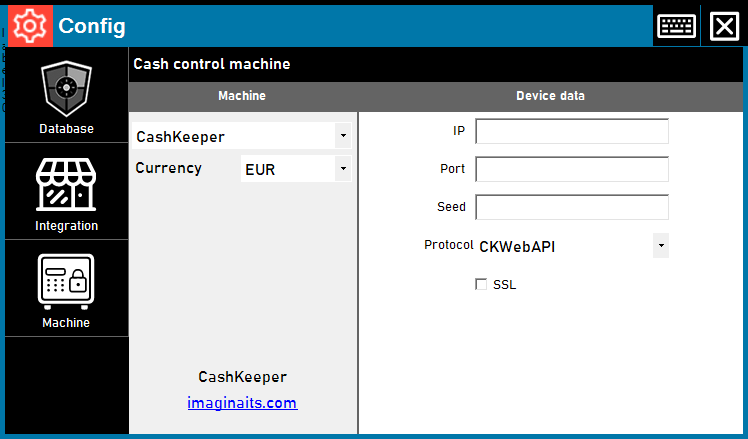
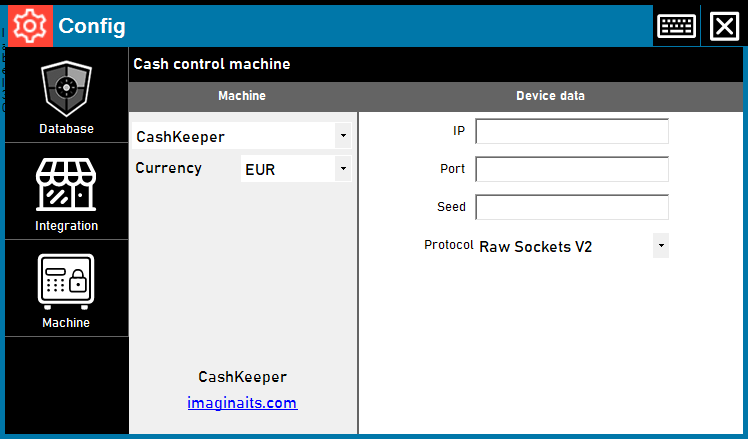
You’ll find the selector under Config › Machine › CashKeeper in the stable release. ImaCash keeps CKWebAPI when opening an earlier CashKeeper configuration. If the provider confirms that the installation uses the native connection, I can choose Raw Sockets V2 in the Protocol field.
What changes when I choose a profile
CKWebAPI shows the SSL checkbox. With Raw Sockets V2, the checkbox disappears and the connection uses the machine’s Host port. Before saving, I confirm the method, address, port, currency and the private key labelled Seed with the provider.
Both screenshots show the fields before connecting. I prepared them using the ImaCash form and left the private fields blank so you can see what changes when you choose a protocol.
Completing an integrated sale in the beta
In the 10 November beta, I added automatic completion for the native profile when automatic payment is enabled for an integrated cash sale and the machine confirms that the same transaction has finished. If change is due, ImaCash also waits for the result to confirm the cash dispensed.
I tested both exact payment and payment with change in the lab using virtual cash. A test with a physical machine is still pending. If confirmation is missing on site, check the sale and the cash with the machine before trying to collect payment again.