

Cashlogy: Set up Cashlogy in ImaCash
Before setup
- The supplier must install and prepare the appropriate Connector, its drivers and the machine. Confirm the installation’s model, firmware, currency and functions before commercial use.
- The address and port are private details of the computer running the service, supplied by the administrator. Do not expose the service to the Internet. The physical USB or RS232 connection is separate from the method selected in ImaCash.
The catalogue, photograph and a successful connection do not demonstrate physical validation of payments, refunds, cash collection or cards. Confirm functions, permissions, denominations and limits with the provider for each installation. Cashlogy app functions belong to the manufacturer’s product and are not automatically attributed to ImaCash.
TCP method · Connector / ConnectorPlus
- Open Configuration → Machine and select CashLogy as an authorised user, with no operation in progress. From beta 4.4.3.1546, Protocol offers TCP · Connector / ConnectorPlus or REST + WebSocket · ConnectorPlus. An existing TCP installation does not change automatically.
- In IP, enter the private address of the computer running the Connector, confirmed by the administrator. Do not assume it is the machine’s address or add a protocol, port or path.
- In Port, use the value confirmed for the selected method: TCP initially shows 8092; REST + WebSocket shows 3000. These are initial values and do not verify the supplier’s setup.
- Select the machine’s actual currency, confirmed by the supplier. The program’s list does not establish which currencies a model or installation supports.
- TCP only: Connector plus selects the local process already prepared by the supplier. This checkbox does not select the new REST + WebSocket method or migrate an installation.
- Select sNEXT only for an sNEXT configuration confirmed by the provider. This option does not select a COM port. Card payments require a prepared and validated terminal and payment service; the checkbox alone does not enable them.
- Admission Always Open changes how cash acceptance is managed. Enable it only if it matches the workflow agreed with the provider; it is not a general requirement for connecting Cashlogy.
- Save through the Configuration workflow and wait for the initialisation result. The new method may display a wait of up to 90 seconds. Saving or receiving an acknowledgement does not confirm a payment or replace supervised testing of the equipment.
Open the ImaCash configuration manual
ConnectorPlus REST + WebSocket · beta from 4.4.3.1546
- Explicitly select REST + WebSocket · ConnectorPlus under Protocol. The supplier must have ConnectorPlus running and check the machine in its own application. A TCP failure does not switch methods automatically.
- In IP, enter the private address of the computer running the Connector, confirmed by the administrator. Do not assume it is the machine’s address or add a protocol, port or path. In Port, use the value confirmed for the selected method: TCP initially shows 8092; REST + WebSocket shows 3000. These are initial values and do not verify the supplier’s setup.
- Enter this installation’s private API key in API key. Keep it out of screenshots and documentation. Enable SSL only when the supplier has configured HTTPS with a valid certificate; notifications then use secure WebSocket.
- Select the machine’s actual currency, confirmed by the supplier. The program’s list does not establish which currencies a model or installation supports. Save through the Configuration workflow and wait for the initialisation result. The new method may display a wait of up to 90 seconds. Saving or receiving an acknowledgement does not confirm a payment or replace supervised testing of the equipment.
This method includes payments with an amount, cash refunds and cancellation of its own payment while cancellation remains possible. Notifications confirm that operation’s outcome; initial acceptance of the request does not confirm cash collected or returned.
Device administration → BackOffice opens ConnectorPlus with the options allowed for the ImaCash user. Refill, change and emptying/collection depend on permissions. Unrestricted withdrawal remains disabled; aggregate administration does not create individual movements or receipts.
Finish and exit the manufacturer’s BackOffice. Closing the ImaCash tracking window does not cancel or release the operation; it can be reopened to check the result.
Inventory by denomination is not enabled in this method: an unknown reading does not mean zero. Withdrawals by denomination, always-open acceptance, cover opening and cashless payments are also unavailable.
Use ConnectorPlus exclusively during an operation. After a disconnection or uncertain result, check the operation and physical cash with the supplier before repeating or restarting. Channel recovery queries the known operation without sending money again.
Available as a beta. Physical CH8/BR3 validation is still pending; publication and laboratory tests do not establish operation on a real model, firmware or installation. Historical catalogue photographs do not extend that validation.


View current solutions on the Cashlogy website
Cashlogy references
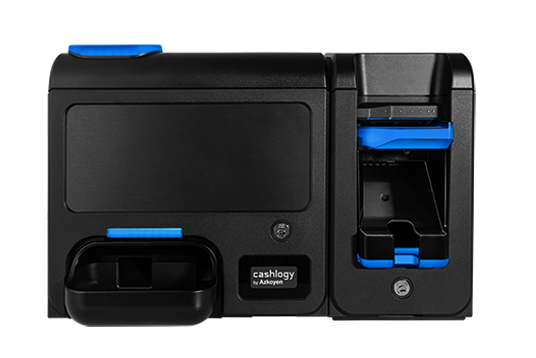
Cashlogy
Cashlogy is the cash management reference in this photograph. The provider must identify the variant and prepare its Connector; this device is not attributed all the capabilities of the current catalogue versions.
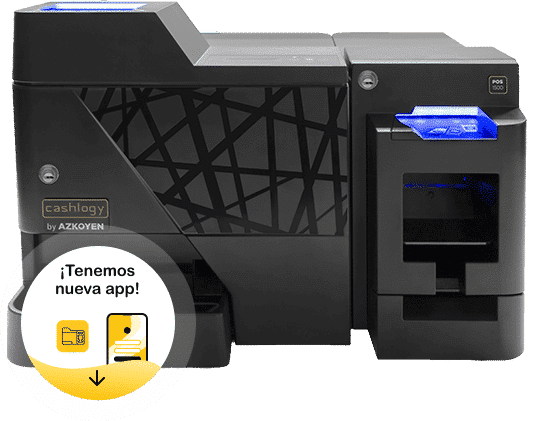
Cashlogy POS 1500
Cashlogy POS 1500 is the historical reference in the retained photograph. Confirm version, Connector, currency and operations with the provider. It is not presented as a new model and its current commercial availability is not inferred.
Cashlogy Safe
Cashlogy Safe is the reference with a safe in this historical photograph. The manufacturer currently presents MaxiSafe; the two names are not assumed to identify the same device or version. Opening and cash collection require the provider’s own configuration and authorisation.
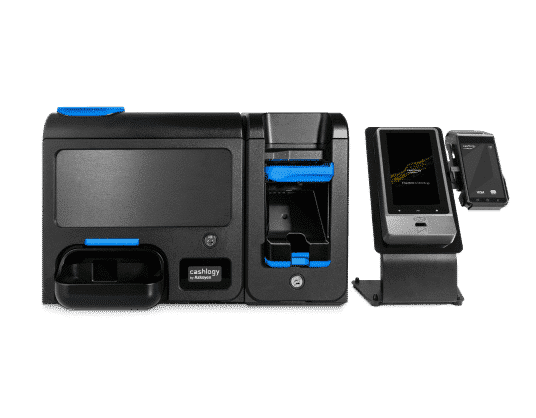
Cashlogy sNEXT
Cashlogy sNEXT is the reference of the assembly with a screen and terminal in this photograph. The current catalogue uses sNext Kit; confirm its components and version. The image does not demonstrate that ImaCash manages every terminal, payment method or service in the assembly.