

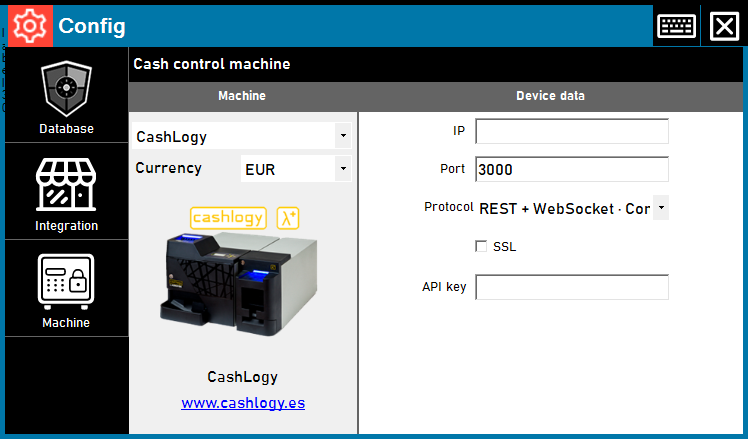
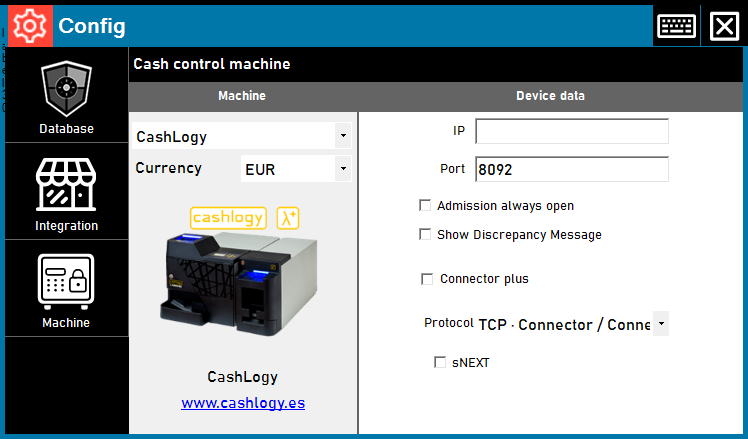
We have added a new way to connect ImaCash to Cashlogy: ConnectorPlus through REST and WebSocket. Available from beta 4.4.3.1546, it is selected in the same machine setup while retaining the existing TCP method.
Choose the method for the installation
The change provides an explicit choice of how ImaCash communicates with ConnectorPlus. REST sends the request and WebSocket receives the operation’s status changes. Acceptance of a request does not yet mean that cash has finished going in or out.
Under Configuration → Machine → CashLogy, Protocol offers REST + WebSocket · ConnectorPlus alongside TCP. Setup requires ConnectorPlus running, the address of its computer, its port—initially 3000—and the private API key supplied for that installation. HTTPS requires the supplier’s configuration and a valid certificate.
Payments, refunds and administration within their limits
We have included payments with an amount, cash refunds and cancellation of its own payment while it can still be cancelled. ConnectorPlus BackOffice opens from device administration and retains ImaCash permissions. Available options depend on each user; closing tracking does not cancel the operation.
The new method leaves inventory by denomination disabled. An unknown quantity is not shown as zero and does not enable withdrawals by denomination. An uncertain result requires checking the operation and cash before repeating; restoring the channel does not submit a payment again.
Available in beta, awaiting the real machine
The package and download are published. The real CH8/BR3 workflow still needs validation with the supplier, so we describe it as a beta without claiming verified models or firmware. Images show the real form in an isolated demonstration, with private fields empty and no connection or cash operation.