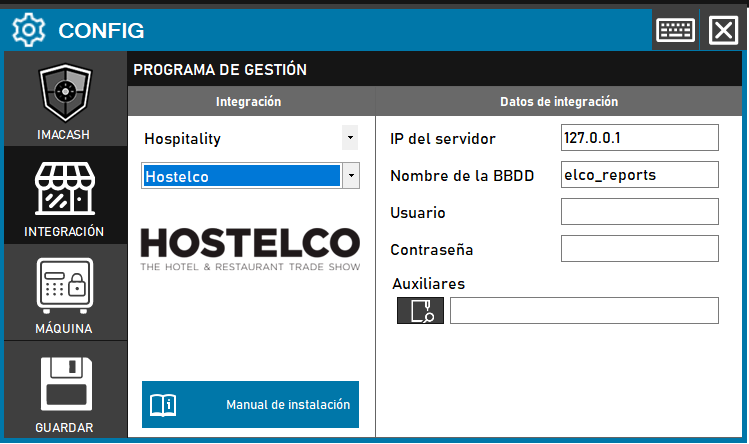
To integrate Hostelco Software with ImaCash, the technician must enter the server IP and database credentials, and also select the path to the user file (Auxiliaries file), which must be provided by Hostelco.
Steps to follow
- CONFIG > INTEGRATION in ImaCash.
- Management Program:
- Category: Hospitality
- Integration: Hostelco
- Integration data:
- Server IP: Enter the IP address of the server (e.g. 127.0.0.1).
- Database name: Enter the name of the database (e.g. elco_reports), which is usually the default.
- User: Enter the database user.
- Contraseña: Private information provided by the administrator. Enter it only in ImaCash.
- Auxiliary: Click on the folder icon and select the **.user accesses file provided by Hostelco.
- Save: Click the SAVE button (floppy disk icon).