Set up Aseproda
Aseproda has one public page. Your supplier must confirm whether your installation uses Visual FoxPro files, a MySQL connection or an API. Follow only the instructions for that interface; do not change a working setup because of a version name.
File connection
Prepare and save the connection
- Prepare 32-bit VFPOLEDB on the ImaCash computer using the authorised installer. The administrator must confirm all three Visual FoxPro sources and their associated files, accessible for queries under the Windows account running ImaCash. Do not rename or convert the files. If the supplier confirms a free-table folder as the VFPOLEDB source, enter that folder manually in the corresponding field: the picker does not infer it from a selected file.
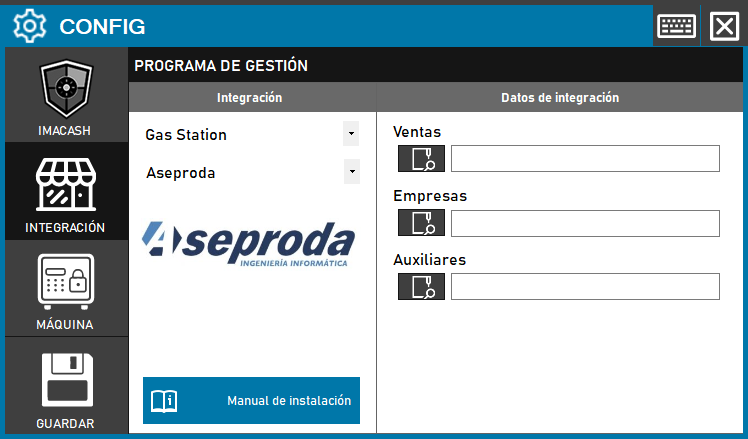
- Open Configuration > Integration, select POS > Aseproda and the file profile confirmed by the supplier. It displays the Transactions, Companies and Auxiliary fields.
- Under Transactions, select the sales source file confirmed by the supplier. The old screenshot calls this field Sales. The button opens a file picker; do not infer the path from a folder name.
- Under Companies, select the source file for cash movements confirmed by the supplier. This is neither a company filter nor a customer catalogue.
- Under Auxiliary, enter the supplier-confirmed auxiliary source path manually: its button does not open a picker in this mode. This source adjusts sales amounts; it is not a user list.
- Save and check all three sources under the actual Windows user. This mode does not request an SQL server, port or SQL credentials. A connection indicator does not prove that every operation is being captured.
What to check in the readings
The connector groups selected sales by reference and subtracts associated auxiliary amounts. It also reads cash movements, preserving their incoming or outgoing direction. Results are presented as cash; this is not a general breakdown of card payments, mixed payments or change.
The query uses the synchronisation date and a strictly later boundary, without its exact time. Check which records from the same day the source returns; do not assume that changing synchronisation retrieves a complete history.
Terminal, seller and filters
The till comes from the records, but the seller is generic. Check received identifiers against ImaCash’s local filters; this seller does not identify the actual employee, and a filter does not prove a physical operation.
Scope and checks
This connector does not import products or shifts, or write confirmations or cancellations to Aseproda. The supplier must check the edition, structure, period, grouping, deductions and signs against the actual workflow before use. Documentation and a successful connection do not establish physical validation or compatibility with the entire ASEPRODA catalogue.
The historical screenshot has empty fields and shows Gas Station and Sales. The current interface uses POS and Transactions; screenshot labels do not replace the steps above.
MySQL connection
- Within POS > Aseproda, select the MySQL profile confirmed by the supplier. Enter the private server, port, database name, user and password supplied by the administrator. Use an account authorised for the required queries and accessible to the actual Windows user running ImaCash; do not copy credentials from another installation.
- Select the cash payment method from the actual POS catalogue. To include cards, confirm a different card payment method and the Accept cards option. The reader classifies records using those identifiers; it does not prove a bank payment or automatically break down every mixed payment or change amount.
- Save and check the received documents awaiting payment, amounts, references, dates and cashier with the supplier. The reported workstation is generic; do not use it to identify a physical terminal. This connection does not import products or shifts or write confirmations or cancellations to the POS. An open connection proves neither complete capture nor compatibility with every edition.
API connection
Preparation and setup
- Finish any operations in progress before starting. The supplier must prepare the communication component, local bridge and exchange storage, with the necessary permissions for the Windows user running ImaCash. This storage requires both read and write access; a read-only SQL account is insufficient.
- In Configuration > Integration, select POS > Aseproda and the API profile confirmed by the supplier. This profile only displays the Port connection field.
- In Port, enter the ImaCash HTTP listening port agreed with the supplier. It must be free on that computer and match the destination configured in the POS. It is neither the SQL port nor a remote POS port. Restrict the service to the authorised network; the administrator supplies the address and access details privately.
- Save using the disk icon and follow the request to restart with elevation if it appears. After changing the port, close and reopen ImaCash with no operations in progress to start listening with the new configuration.
- With the supplier, check access to the service from the authorised workstation. GET /test, using the prepared private address and port, only checks that the HTTP service responds: it does not verify the bridge, storage, POS or a cash operation. Check those elements separately before use.
What the connector exchanges
ImaCash receives operations prepared for exchange through the API and reads pending operations. The bridge may supply the storage configuration; if unavailable, the existing local configuration is used. This does not mean that the entire POS history is read automatically.
References, amounts, dates and till, company and cashier identifiers come from the received exchange. ImaCash records results in that storage; the supplier must validate that the POS consumes them correctly, including statuses and cancellations. A technical response does not prove fiscal closure, a bank payment or the physical outcome at the cash machine.
Scope and outstanding checks
This mode does not import products or shifts and has no separate cash or card selector. Confirm payment methods, amounts and applied filters with the supplier. Configuration, code or a simulated test does not establish compatibility with a specific edition or physical validation of the complete workflow.