

Set up TPV Fácil in ImaCash
The TPVFacil profile reads the POS SQL Server database. Ask your supplier to confirm that your installation provides the invoice, cash-in and cash-out records used by ImaCash.
Ask your administrator for the private server address, database name, instance and a SQL account with read access. Keep connection details out of guides and screenshots.
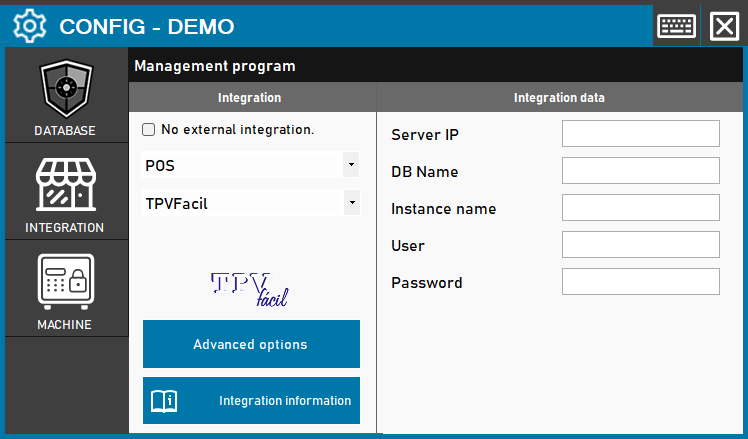
- On the main screen, open Configuration with the required permission and identify yourself if prompted. Under Integration, choose POS and select TPVFacil.
- Fill in Server IP, DB Name, Instance name, User and Password with the details provided. The profile uses SQL credentials and adds the instance to the server address.
- Select X. If you made changes, Save applies the settings in stages and may check server access. Continue editing returns to the form. Exit without saving discards pending changes. Reopen the profile to check what was saved.
What ImaCash reads
The query starts on the synchronization date. From the invoices, it reads cash sales and supported refunds. Refunds and cash-outs appear as negative amounts. Cash-ins are read separately.
The operator filter applies to invoices. Cash-ins and cash-outs are read separately and are outside that filter. The till shown comes from the POS record. Check with your supplier which records belong to your till.
What happens when you confirm or reject
Confirming or rejecting in ImaCash leaves the TPV Fácil database untouched. The list shows source records. Check the receipt and the cash position before processing the same operation again.
If rows are missing, check the date, the recorded payment type and the invoice operator filter. If access fails, ask your administrator to check the server, instance, database and read permissions.