

Set up TechniWeb with Firebird
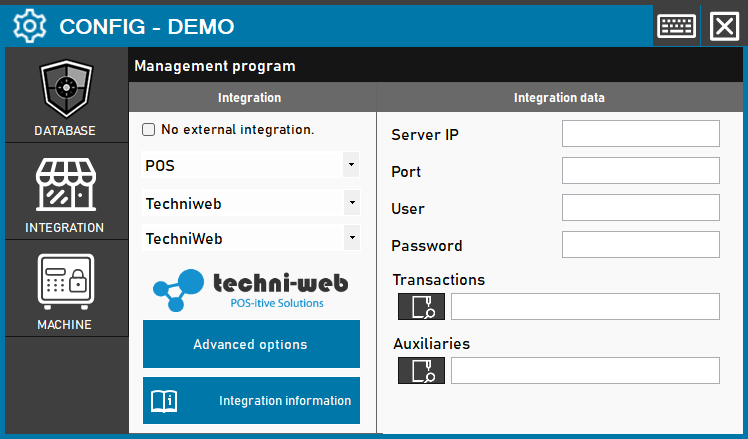
- In Configuration, open Integration, choose POS > Techniweb and select TechniWeb.
- Ask your administrator for the Firebird server address, port and read account. Enter the details in Server IP, Port, User and Password. Select the ticket database under Transactions and the user database under Auxiliaries. Confirm Firebird can access both destinations.
- Close Configuration with X. If changes are pending, choose to save, continue editing or exit without saving. Reopen the profile to check the settings you chose to save.
- After saving the profile, reopen it and open Advanced options. Choose the cash and card methods that match your POS and save the options. If the codes are unclear, check them with your administrator before processing payments.
What ImaCash exchanges
The profile reads recorded tickets from the specified date and time. It supports an operator filter and includes the configured cash and card methods. A ticket in the list may already have been paid.
Confirming or rejecting a ticket in ImaCash does not settle or void it in Firebird. Check the result in the POS before repeating a payment.
Confirm the exchange method for your installation and arrange a supervised test before the first use. If the result is uncertain, check the same transaction in both systems before repeating it.