

SGIRetail profile in ImaCash
SGI Retail is the point of sale from Global Software Partner. The profile is named SGIRetail in the ImaCash selector.
SGI Retail information from Global Software Partner
Before editing, ask your administrator for the private SGI Retail SQL Server details and confirm the installation scope with support.
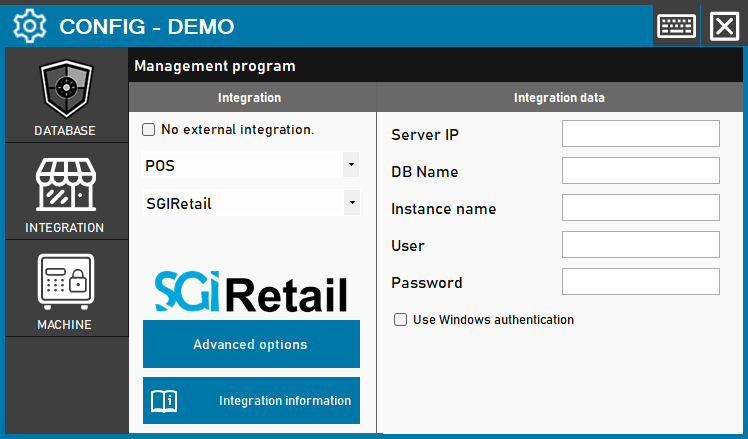
- On the main screen, open Configuration, go to Integration, choose POS and select SGIRetail.
- Fill in Server IP, DB Name and Instance name if applicable. Use a private User and Password, or select Use Windows authentication if the account running ImaCash has read access.
- When closing Configuration, review the changes and save when prompted. Reopen it to check the profile. Saving confirms the settings only.
This profile has no separate port field. In Advanced options, confirm with support which SGI Retail payment methods represent cash and card.
Reading sales
The profile attempts to read documents and their payment lines. Sales capture requires technical review before this profile is used at the checkout. Opening the connection or listing payment methods does not verify capture of a sale.
Confirming or rejecting in ImaCash
This profile sends neither a payment confirmation nor a void to SGI Retail. Check the sale in the POS before repeating an operation.
Scope and verification
If support validates capture for your installation, check the reference, date, amount with cents and payment method before use. Also confirm which operator filters apply. A list of terminals does not establish a checkout filter.
Check refunds, mixed payments and cash dispensing separately with your device.