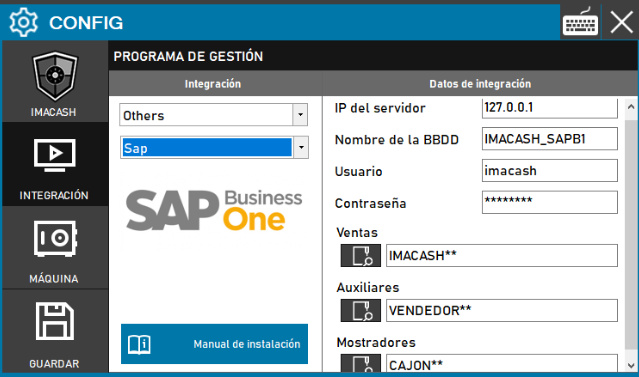
This configuration is used for the usual connection with SAP's ERP, focused on general business management.
Steps to follow:
- Access the CONFIG → INTEGRATION menu in the ImaCash interface.
- In the Management Program section, select the following values:
- Category: Others.
- Integration: Sap.
- In the Integration Data section, complete the server information:
- Server IP: Enter the IP address of the SAP server (example: 127.0.0.1).
- Name of the BBDD: indicate the name of the company or database (example: IMACASH_SAPB1).
- User: Enter the username for access (example: imacash).
- Contraseña: Private information provided by the administrator. Enter it only in ImaCash.
- Configure file paths using the magnifying glass icon:
- Sales: Specify the path for the transaction exchange (example: IMACASH**).
- Auxiliary: Indicate the path for employee data (example: VENDEDOR**).
- Counters: Define the path for drawer management (example: CAJON**).
- Click the SAVE button (floppy disk icon) to confirm the settings.