


Sage Retail Configuration
To integrate the Sage Retail Software with ImaCash, the technician must configure the connection parameters to the server where the management program database is hosted. Most fields have default values that can be edited according to the needs of the customer installation.
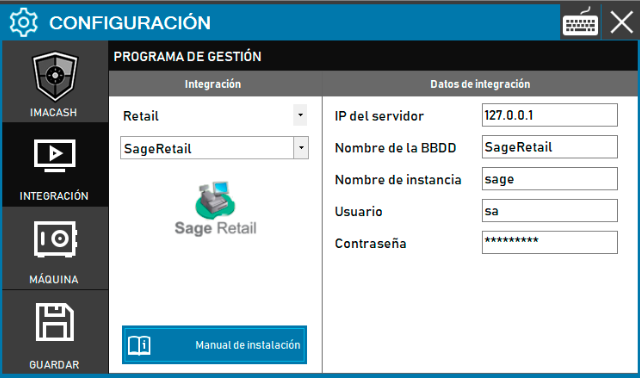
Steps to follow:
CONFIG → INTEGRATION in ImaCash.
Management Program:
Category: Retail.
Integration: SageRetail.
Integration data:
Server IP: Enter the IP address (default 127.0.0.1).
Database Name: Enter the name of the database (by default SageRetail).
Instance name: Specify the connection instance (by default sage).
User: Enter the access user (by default sa).
Password: Enter the established access code.
Save: Click the SAVE button (floppy disk icon).