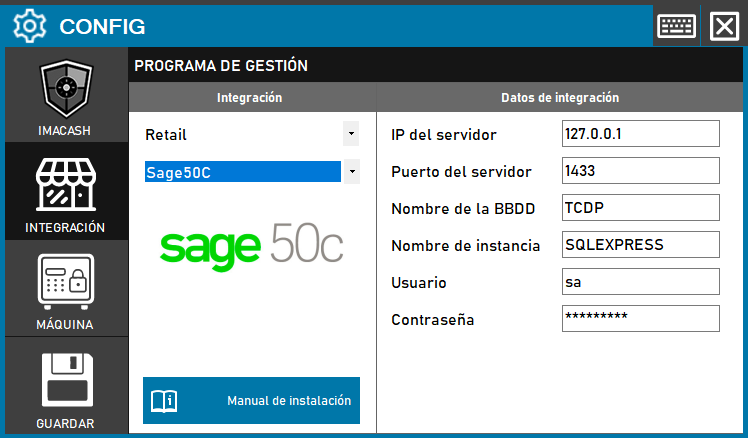
To integrate the Sage 50C Software with ImaCash, the technician must configure the connection parameters to the SQL server where the management program is hosted. It is essential to fill in the sections of the network address and the specific name of the database.
Steps to follow:
- CONFIG → INTEGRATION in ImaCash.
- Management Program:
- Category: Retail.
- Integration: Sage50C.
- Integration data:
- Server IP: Enter the IP address (default 127.0.0.1).
- Server port: Enter the corresponding SQL port (default 1433).
- Database Name: Enter the name of the database (e.g. TCDP).
- Instance name: Specify the instance of SQL Server (e.g. SQLEXPRESS).
- User: Enter the access username (default sa).
- Password: Enter the established access code.
- Save: Click the SAVE button (floppy disk icon).