

Sage 200: prepare the cash exchange
The Sage200 profile reads movements from a specific SQL Server exchange. Before setup, the supplier must confirm that your installation prepares this exchange and which operations it contains.
Select Sage200 in ImaCash. Sage200C has a separate profile and cannot be assumed equivalent; this guide does not establish support for every Sage 200 edition, Sage 50, Eurowin or their Cloud services.
Ask the administrator for the SQL Server destination, database and a private account with read access to the exchange. Confirm edition, currency, dates and scope with the supplier before using a cash device.
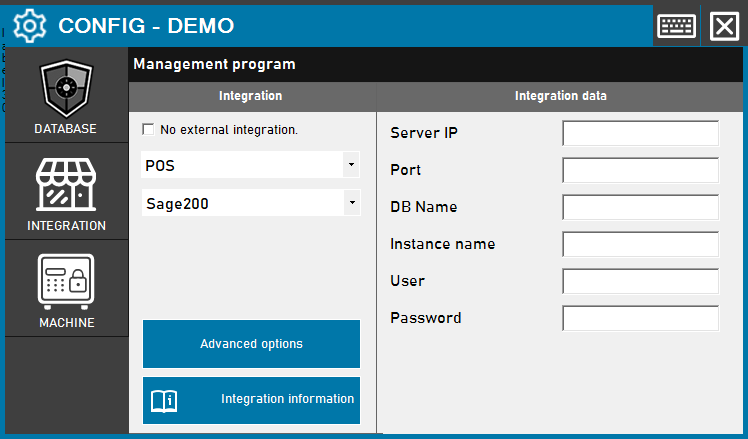
- Open Main > Configuration > Integration > POS and select Sage200, with authorised Configuration access. Retail is this page’s commercial classification; the program selector is under POS.
- Fill in Server IP, Port, DB Name, Instance name, User and Password with the confirmed private details. Do not publish values or access screenshots. Check how the instance and port work together before saving.
- When closing with X, review saving in stages: Save, Continue editing or Exit without saving. Discarding does not reverse stages already saved. Reopen to check the retained settings; a successful SQL connection alone does not validate the exchange or payments.
Server and database identify the authorised destination. Instance is used with the profile’s default port; if another port is specified, server and port are used and the instance is ignored. Confirm this combination with the administrator. This profile uses an SQL username and password, without integrated Windows authentication, a DSN or a transaction folder.
Which movements it reads
It reads from the specified date and time, inclusively, without its own pending-status filter or end-date limit. It recognises the exchange’s cash and card collection types for till payments or deposits; other comments are excluded. The amount comes from the cash field even for rows classified as card: check amounts, signs and split payments; do not infer a bank total.
Confirming and rejecting
Confirming or rejecting in ImaCash does not write a confirmation, payment or cancellation to Sage. A row does not establish that payment is still due. If a monetary outcome is uncertain, compare the operation in both programs and the actual cash before repeating or restarting.
Scope to check
The query has no source company, shop, till or operator filters of its own. Local display filters do not change that scope. Complete history, full split payments, refunds inferred from their sign, bank totals, code lookup, items, stock and shifts are not established. Having the profile does not prove physical validation or compatibility with every installation.
Reopen to check settings and review the exchange with the supplier and support. If movements are missing or the installation uses another format, request a review without changing credentials or starting payments as a test.