

RepairDesk: review the exchange before configuring
The RepairDesk profile reads invoices and their payments through an earlier exchange using a private key. Having the profile in ImaCash does not establish that your account’s API still accepts that method; confirm this with RepairDesk and support before use.
The brand identifies the program covered by this guide, without establishing certification or compatibility with every edition. Current documentation also describes Bearer tokens and OAuth: this profile does not implement those methods, and their credentials should not be treated as interchangeable because their names sound similar.
Ask the administrator to confirm the accepted access method and provide the corresponding key through a private channel. Do not regenerate or replace keys to test a connection. This guide describes the existing profile; access to your account and use with devices require validation beforehand.
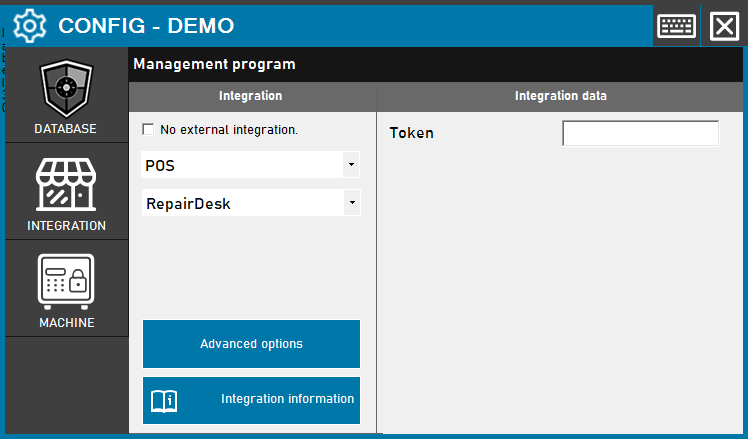
- Open Main > Configuration > Integration > POS and select RepairDesk. Authorised Configuration access is required. Other is the page’s commercial classification, rather than the program category to select; do not replace an integration in use for a trial.
- In Token, enter only the private key confirmed by the administrator and supplier for this exchange. It is not an ImaCash user password or an OAuth token that can be assumed equivalent. Do not publish or send the value in a screenshot.
- Closing with X can offer saving in stages, continuing editing or exiting without saving. Read the messages: discarding does not reverse stages already saved. Reopen to check the retained value; starting or saving the profile alone does not verify that every query works.
This profile does not request a server, database, SQL login, extra password, port or folder. The private key field already described is the only connection detail shown. Confirm the access method before entering any credentials.
What this profile queries
It reads the invoice list and payment details. It classifies using the first payment method and uses the document’s total; this does not calculate the cash share of a mixed payment. Creation date guides the scan but does not establish an exact time cut-off or complete history. Compare currency, cents, dates, statuses and references with the person responsible before operating; documents may already have recorded payments.
Confirmation and refusal
Confirming or refusing in ImaCash does not write a payment, confirmation or cancellation to RepairDesk. A row or a closed window does not prove that cash is due or that a bank has authorised payment. If a monetary result is uncertain, check the transaction and actual cash before repeating or restarting.
Scope and conditions requiring validation
The query does not apply terminal or operator admission filters or fetch additional pages. Local view filters do not change that query; the employee reference identifies the document creator and does not establish who took each payment. Store isolation, a terminal directory, complete history, refunds, complete mixed payments, bank totals, products, stock and shifts are not established.
The result to verify is a reread configuration and an exchange reviewed with the supplier within these limits. If the account only offers another access method, operations are missing or a rejection occurs, keep the configuration and request review. Do not recover history, change keys or request payments to test it.