

Set up the ProtectData profile
ProtectData is the profile name in ImaCash. It reads completed sales and active payments from SQL Server. Confirm the supported edition and structure with the supplier; this profile does not establish support for every similarly named solution or a validated commercial installation.
The administrator must provide the SQL Server destination, database, instance if applicable, and a private account with read access to sales, payments, payment methods, operators and terminals. Check access from the computer and Windows account running ImaCash. Keep these details private and do not substitute administrative permissions for read permissions.
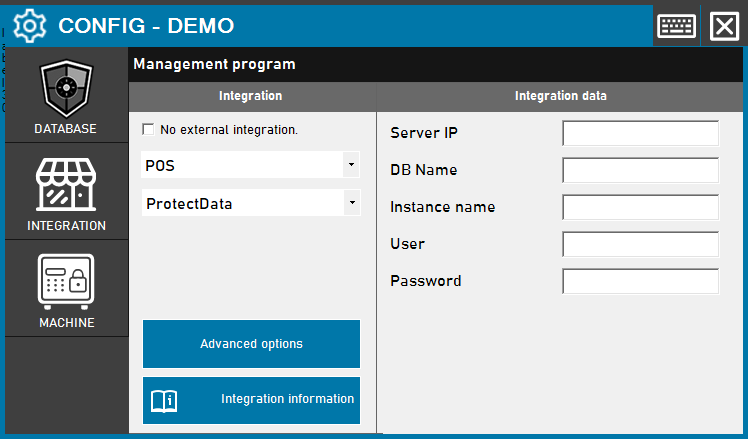
- From Main, open Config with authorization and go to Integration. Select POS > ProtectData. Accessing and modifying the integration require their own permissions.
- Enter the private destination in Server IP, the confirmed database in DB Name, and Instance name only when a named instance is used. User and Password are the supplied SQL credentials. This profile does not use integrated Windows authentication or offer a separate port field; confirm the destination with the administrator.
- When closing with X, Save confirms the pending stages; Continue editing returns to the form and Exit without saving discards pending changes without reversing stages already saved. Reopen to check the fields. Saving or seeing Connected does not by itself prove an SQL connection, a complete sale reading or physical cash collection.
Sales and filters
It reads completed sales with active payments from the synchronization date and time, with no end limit of its own. This is not a list of amounts still unpaid. It can restrict results to selected operators and terminals and retrieve their lists. It provides no company or cash drawer lists or dedicated filters for them.
Payments and checks
The profile distinguishes source cash and card payments. Check other payment methods before using them: they must not be treated as equivalent to cash or card. A sale with several payments can return several rows with the same reference; do not assume full mixed-payment support or freedom from duplicates. No row proves bank authorization or settlement.
Confirming and rejecting in ImaCash do not write confirmation or cancellation back to the POS. Compare the date, amount, operator, terminal and payment method with the receipt. If an operation is uncertain or a reference repeats, review the record and actual cash before repeating, resynchronizing or restarting.
Reading does not establish complete history, products, stock, shifts, a bank total or remote writing. Confirm the edition, permissions, dates, amounts and behavior of each payment method with the supplier and support before use. The exact commercial brand and compatible versions cannot be inferred from the profile name; physical validation is not established.