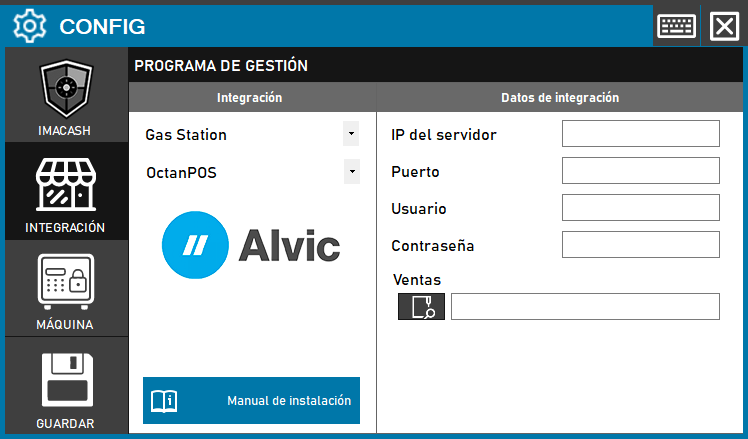
OctanPOS connects to ImaCash through the installation's Firebird server. Ask Alvic or the administrator for the address, port, an authorised account and the active database's server-local path or Firebird alias; do not use a backup copy.
Steps to follow
- In ImaCash, open Configuration > Integration and select OctanPOS.
- Management program:
- Category: Gas Station
- Integration: OctanPOS
- Integration data:
- Server IP: Enter the server IP address.
- Port: The actual Firebird TCP port, normally 3050. Confirm it with the administrator; this is not an HTTP port.
- User: A Firebird account authorised for that database. Do not assume the form's default credentials are valid.
- Password: Private information provided by the administrator. Enter it only in ImaCash.
- Sales: The absolute FO5.FDB path on a local disk of the specified server, for example C:\ALVIC\FO5.FDB, or an existing Firebird alias, for example OCTANPOS. These examples do not identify your installation. Do not enter a UNC path (\\server\share\FO5.FDB), a mapped network drive or an IP:port: prefix; IP and port belong in their separate fields. The Windows file picker does not turn a shared path into a valid server path.
- Save: Click the SAVE button (disk icon).
Required permissions
The operating-system account running the Firebird service must be able to access the file and its folders, with the read and write permissions required by the engine. Being able to open a share as the Windows user does not prove that access. The administrator must also check Firebird database-access restrictions and, when an alias is used, that it points to the active database.
ImaCash requests the ALVICCONS role. The administrator must confirm that it exists in that database, that the account can assume it and that it has SELECT access to the sales, payments, terminals, people and catalogue tables queried by OctanPOS. SQL permissions and file permissions are separate: this read-only integration does not need table modification privileges.