

Connecting software to a machine solves only part of the job. Next comes understanding what happened to an operation, reviewing the day and finding a clear explanation when needed. That thread brings together ImaCash integrations, the evolution of our REST API, ImaPlay reports and the manual we are expanding. I want to give that work more room, starting with this overview and continuing with posts from Monday to Friday.
More connections, each with its own scope
ZooVET has connected its veterinary software to ImaCash using our REST API. For a clinic, the starting point is to agree the required version, available operations and installation preparation with ZooVET. This is the specific integration we are presenting, with its scope confirmed by their team.
We have also extended the Cashmatic connector with native replenishment, recycler emptying and denomination changes. This is progress since the connector was introduced: the code is included in the stable ImaCash release, while physical validation of models and firmware remains pending. Each installation requires confirmation of the equipment, functions and actual outcomes.
REST API: track the request and understand the outcome
Software may request cancellation of an operation and then need to find out what happened. The optional V2 extension tracks that request, lets the same request be retrieved without creating another and distinguishes Cloud status from confirmation reported by ImaCash. V1 retains its contract for existing integrations.
We have accompanied this work with a guide covering ten operations, expandable examples and an OpenAPI reference. If an outcome is missing or inconsistent, it remains under review: receiving a response or changing a status does not replace checking the physical cash.
A manual that shows the route
We are rebuilding and expanding the ImaCash manual function by function. Users and permissions, the main screen, settings, configuration, shifts and manual operation preparation already have documented walkthroughs. Work continues across the whole program, with sections still to develop and review.
We are reworking the video guides to start from the main screen and retain complete windows, with the access point highlighted, captions and written explanations in six languages. We use native forms in isolated demonstrations with fictitious data and no real operations. This shows where an option is and what to check before using it.
ImaPlay: review the day and take the report with you
In ImaPlay Server we have organised reports into sections, with date filters and access to details. Results can be exported to Excel or PDF, while closing and tips have their own printing actions. Individual tips retain their breakdown by worker.
These improvements reached the stable release in October. Their views and outputs deserve an article of their own, even though we have already mentioned them: choosing a period, understanding each section and obtaining the document are distinct parts of daily work.
There are also visible improvements when setting up and using ImaCash: the step-by-step wizard and actions from a single selected sale are included in stable version 4.4.3.1529, published on 1 November.
Knowing which step we are on
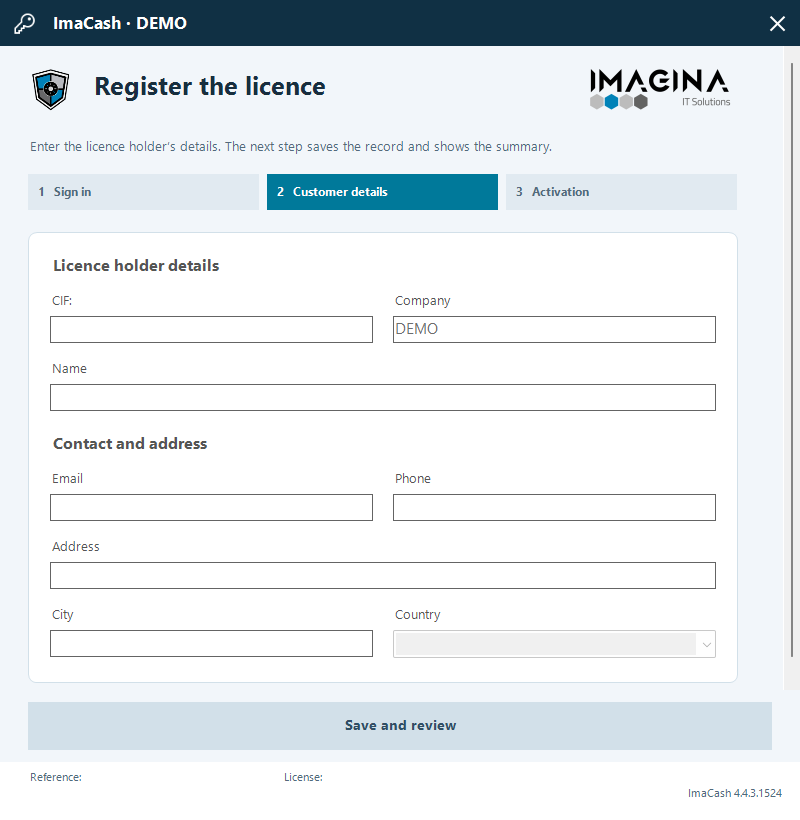
When preparing an installation, the wizard distinguishes Sign in, Customer details and Activation. The holder’s details are grouped together, and the bottom actions remain visible while scrolling through the form. We have made it easier to review the information and find the next step, including with larger fonts or display scaling.
Save and review saves the record and displays its summary. Check the details before pressing it: this is more than a preview. Activation retains the checks and conditions that apply to each installation.
A single sale now has its action bar
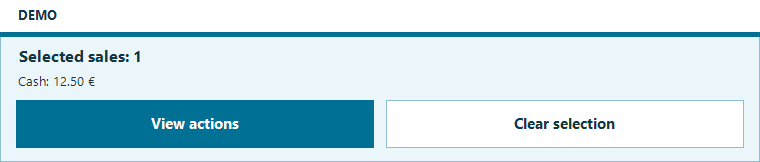
The other change appears when you select a pending sale. The bar is shown from the first selection, with the count and amounts. There is no need to add a second sale as a workaround to find the options for the first.
View actions opens the available options while keeping exactly the chosen selection. Clear selection removes the marks and leaves the sales pending. Any subsequent actions retain their permissions and confirmations; the bar helps you prepare a decision without treating a payment or cancellation as completed.
Explore ImaCash · Read about selecting operations
There is more to tell than fits into two weekly updates. From now on, the journal will run from Monday to Friday, giving each subject room for explanation and links to its guides. Connections, integration tools and everyday use will each get their own story.
Explore the ZooVET integration · REST API guide · ImaCash manual · Explore ImaPlay