Technical beta: The integration is implemented and available for controlled testing before it is used for real cash transactions.
This connector is exclusively for Lightspeed Retail X-Series, formerly Vend. It is not compatible with Lightspeed Restaurant K-Series or Ikentoo.
Prerequisites
- A Retail X-Series account and the current store prefix or URL, for example https://my-store.retail.lightspeed.app.
- An approved Private App with sales:read, users:read and payment_types:read. A personal token is accepted only for compatible legacy accounts.
- Outbound HTTPS on port 443 to *.retail.lightspeed.app. No inbound ports or local database access are required.
- An active cash payment type. ImaCash only imports sales that are already closed in Lightspeed.
ImaCash configuration
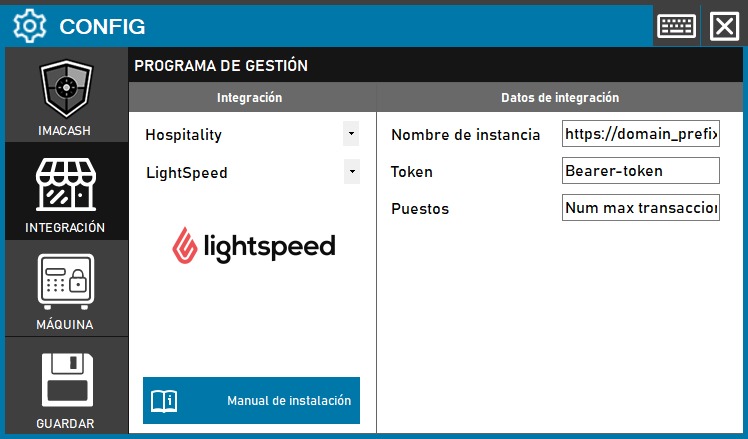
- Open Configuration > Integration > POS and select Lightspeed Retail X-Series in the Retail category.
- In API URL, enter the store prefix or its full *.retail.lightspeed.app URL.
- Paste the Private App token into API key. Do not send it by email, screenshots or support logs.
- Save the configuration. ImaCash validates the store, token, users and payment types against the real API before accepting it.
Behaviour and scope
- Cash sales are imported for their cash amount; card-only sales are ignored.
- For a mixed payment, only the cash component is imported. Negative cash amounts are treated as refunds.
- The beta is read-only: it does not confirm payments or modify sales in Lightspeed.
- Synchronization is incremental, paginated and bounded; after a 429 limit it preserves the cursor and honours Retry-After.
Mandatory test before production
Validate a cash sale, a card-only sale, a mixed sale, a refund and recovery after a network outage or 429. Confirm that repeated synchronization does not create duplicates.
Official documentation
- Authorization: Private information provided by the administrator. Enter it only in ImaCash.
- API scopes
- Sales search