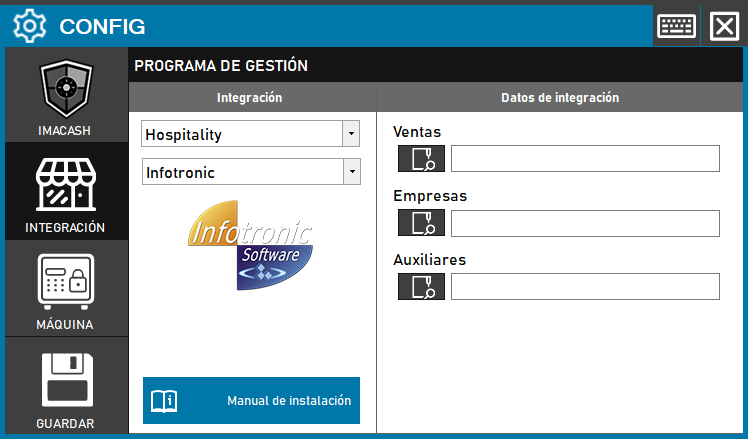
To integrate Infotronic software with ImaCash, the technician must install the “VFPOLEDB” dependency (downloadable from the ImaCash Cloud) and fill in the paths for three key files (Sales, Companies and Auxiliary) provided by the INFOTRONIC team.
Steps to follow:
- Prerequisite: install the “VFPOLEDB” dependency.
- CONFIG → INTEGRATION in ImaCash.
- Management Program:
- Category: Hospitality
- Integration: Infotronic
- Integration data (File Paths):
- Sales: Enter the full path of the Sales file (e.g. tickets.dbf).
- Companies: Enter the full path of the Companies file (e.g. personal.dbf).
- Auxiliaries: Enter the full path of the Auxiliaries file (e.g. movcaja.dbf).
- Save: Click the SAVE button (floppy disk icon).
Note: For ImaCash to collect sales, the Infotronic software must record the money given. There is a setting in Infotronic to automate this process.