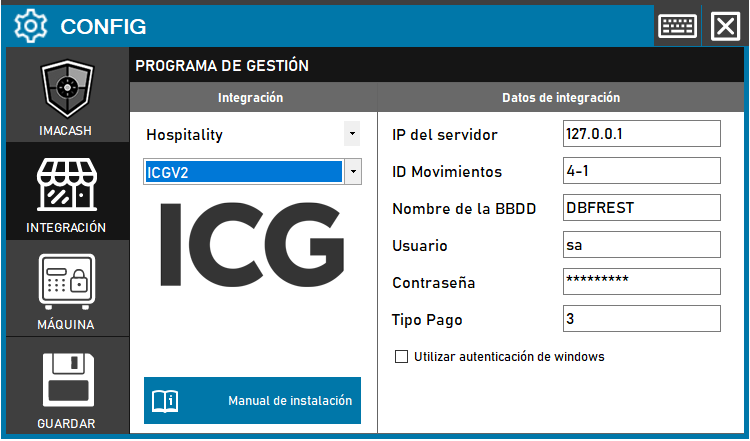
The technician must fill in the “Server IP”, “Database name” and “Password” for the server where ICG is installed. The user name is usually the default one.
En el «ID Movimientos» deberemos configurar el apartado de Entrada y Salida del efectivo, siempre separado por el «-«, esta información la veremos en [COBROSPAGOS].
Steps to follow:
1. Open the integration settings:
- Go to CONFIG → INTEGRATION in your ImaCash system
2. Select the POS system:
- Select the «Hospitality» category
- Then select ICGV2 from the drop-down menu
3. Complete the connection details:
- IP del servidor: Introduce la dirección IP del servidor (ejemplo: Private information provided by the administrator. Enter it only in ImaCash.)
- ID Movimientos: Configurar entrada y salida del efectivo separados por «-» (ejemplo: 4-1)
- Nombre de la BBDD: Nombre de la base de datos (ejemplo: DBFREST)
- User: user with access permissions (example: sa)
- Contraseña: Private information provided by the administrator. Enter it only in ImaCash.
- Tipo Pago: Identificador del tipo de pago (ejemplo: 3)
- Utilizar autenticación de windows: Marca esta casilla si deseas usar autenticación de Windows
4. Save the configuration:
- Click the SAVE button
Important: check which ICG version is installed at the customer before selecting the correct integration variant.