Set up Galaxy Hotel with ImaCash
This profile exchanges FTP files and sends notifications to the Galaxy Hôtels API. The supplier must confirm the installed edition and export; this does not validate similarly named products or every cash device model.
1. Prepare the exchange
Ask the supplier for a compatible export, a dedicated FTP destination and folder, and private FTP and API accounts. FTP access must allow listing, downloading and deleting exchange files; the ImaCash Windows user must be able to create and write its local temporary folder. Access must be prepared for the specific installation.
2. Select the profile
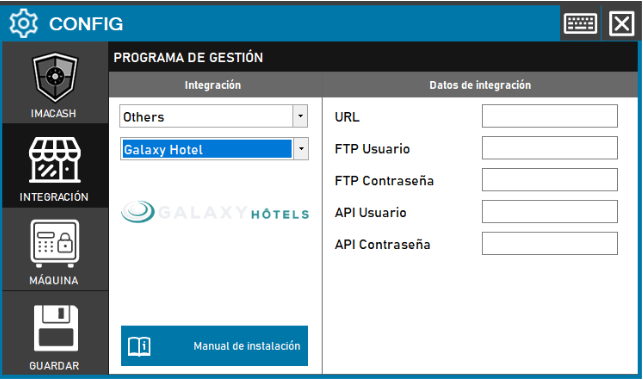
Open Configuration > Integration, select POS, then Galaxy Hotel. Set up the cash device separately. This profile does not require a DSN or an SQL database.
3. Complete the five fields
URL takes the confirmed FTP destination and folder where applicable; an ftp:// prefix or a destination without it is accepted. It is not the API URL or a web page; this profile does not interpret SFTP or FTPS. FTP User and FTP Password provide exchange access; API User and API Password are the supplier API account. Do not swap the accounts or publish their values.
4. Save when closing
Close Configuration and confirm saving when prompted; follow the suggested restart if applicable. The initial connection checks the FTP listing: it does not by itself validate downloads, deletion, API access or a completed payment.
5. Understand file capture
ImaCash collects the CSV files available in the exchange. Files are consumed during reading, before payment confirmation; do not restore or resend them to repeat an operation. Selecting another date does not recover consumed files or prove a complete history.
6. Check format and filters
The supplier must confirm the exported format. The simple format represents cash with the reading date and fixed references; the extended format may provide date, workstation, operator and payment type. Compare these references with local filters. Accept cards does not prove a bank payment; there are no catalogues, items, shifts or bank total.
7. Check notifications to the source
After an operation completes, the connector attempts the corresponding confirmation or cancellation notification to the API. A local result does not prove Galaxy accepted that notification. Rejecting an operation locally does not automatically cancel the source sale. Check both systems.
8. Verify before live use
With the supplier, validate export, amounts and signs, capture, notifications and the actual device result, including supported refunds. A connection or a published page does not replace supervised physical testing. If the result is uncertain, check the operation and actual cash before repeating, resynchronising or restarting.
Earlier interface screenshot