Set up Farmanager with ImaCash
The ImaCash profile is named Farmanager, the Cofares pharmacy management program. It queries MySQL; the provider must confirm that the installation’s edition and structure are supported by the connector. Configure the cash machine separately. This guide does not validate every edition or physical operation.
1. Prepare MySQL access
The provider must prepare access to the operational database expected by the connector and a private query account with the required permissions. Check communication under the actual ImaCash Windows user with installation protections enabled. The administrator supplies private details; do not copy another pharmacy’s accounts or parameters or use example credentials.
2. Select the profile
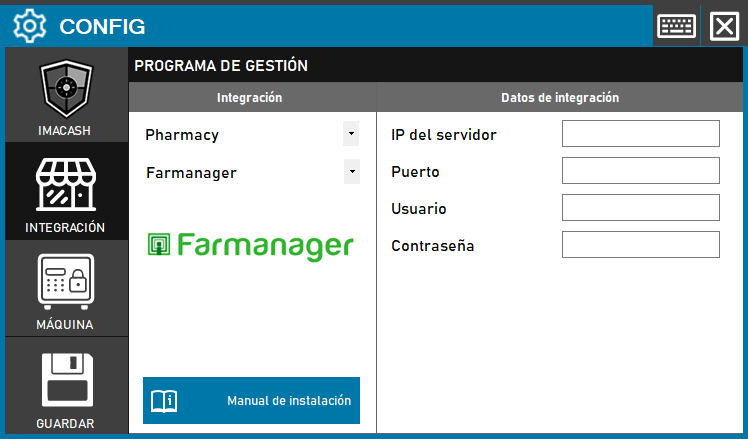
Open Configuration > Integration, choose POS and select Farmanager. The historical screenshot shows Pharmacy and the Guardar button; the current form uses POS and confirms saving when closing.
3. Enter the four private details
Server IP takes the confirmed private host of the MySQL server. Port takes its connection port, supplied by the administrator, with no universal value. User and Password take the private account authorized to query it. This profile does not request a folder or an editable database name: do not prepare exchange files or try to select another database through unrelated fields.
4. Save when closing
Close Configuration and confirm saving when prompted; follow any proposed restart when applicable. Saving attempts to open and close the connection. Saving, a ping or a connected indicator do not validate every query, sale reading or a payment. An empty list also does not prove there are no movements.
5. Check cash and mixed payments
Movements are queried from the selected synchronization date and time, inclusive, along with the cash portion of mixed payments identified at the source. Check the amount net of discounts and the sign of refunds. For a mixed payment, verify that only the intended cash portion is captured, without duplication or confusion with the full sale amount. Reading that portion does not validate card authorization or settlement.
6. Check the filters
Review Configuration > Filters with support: counters, employee identifiers and their mapping to names. An employee list does not prove that a name filter resolves the correct identifier. Verify which movements are included and excluded before separating cash registers; do not assume company isolation or treat an empty result as proof of a correctly configured filter.
Confirmations and scope
Confirming or rejecting in ImaCash does not write a closure or cancellation in Farmanager. Fiscal closure, shifts and bank totals are not validated. Item queries are configured and validated separately; their existence does not prove payment completion. Do not assume complete historical recovery or absence of duplicates when changing the date or resynchronizing.
7. Verify before commercial use
Arrange a supervised test comparing reference, date and time, amount, discounts, sign, currency, counter, employee and outcome across Farmanager, ImaCash and the machine. Include cash, mixed cash portions and refunds confirmed by the provider for the installation. If the outcome is uncertain, review both systems and actual cash with support before repeating, resynchronizing or restarting. This documentation review does not replace physical validation.