Set up Ultus with ImaCash
This historical Expert Bening guide refers to the Ultus profile in ImaCash. Confirm your installation’s edition and format with the provider before setup. This documented link does not establish compatibility across the expert network, other similarly named products or all cash devices.
Prepare private access
The provider must confirm the SQL Server host, active database and an authorised read account. Windows authentication must work under the actual Windows user running ImaCash. Access details are private: keep them out of screenshots, messages and public documents.
Select the current profile
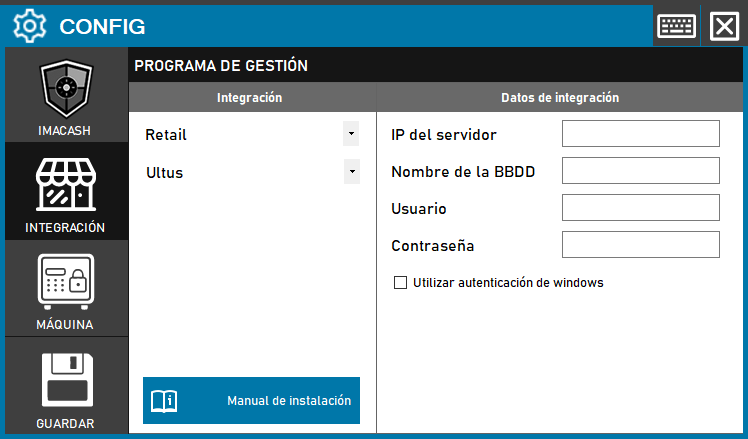
Open Configuration > Integration, choose POS and select Ultus. The historical image shows the Retail category and a Save button from another interface; these do not describe the current category or saving process. Configure the cash device separately.
Enter the connection details
Server IP takes the SQL server and, where applicable, the confirmed instance. Database name takes the active database, not a file path or ODBC DSN. User and Password take the private account. Use Windows authentication selects the Windows identity instead of these credentials. This profile has no separate port field and requires no exchange folder.
Save and check
Close the changed configuration and confirm that you want to save it. Follow the proposed restart where applicable. The check opens and closes the SQL connection; it does not verify the complete query, document selection or a payment. An empty list does not prove that no transactions are pending.
Which records are read
The profile reads lines in the expected format from the start of the selected day; the specific time does not limit this query. It distinguishes cash and card lines according to the source format, but provides no payment-method selector or proof of bank payments or split payments. Confirm references, dates, amounts, signs, currency, till and salesperson codes with the provider. General company, till or operator filters do not limit this query; do not assume isolation between tills.
Confirmation and uncertain outcomes
Confirming or rejecting in ImaCash writes no completion or cancellation to Ultus. Complete historical recovery, bank totals, item or operator catalogues and shift management are not established. If an outcome is uncertain, review both systems and the actual cash with support before repeating, resynchronising or restarting; do not change the date to force a repeat.
Validate before real use
Arrange a supervised test of an identified transaction with the provider. Compare its reference, date, amount, sign, currency and till, then check the result in the POS, ImaCash and cash device. This guide and a successful connection do not replace physical validation of the installed combination.