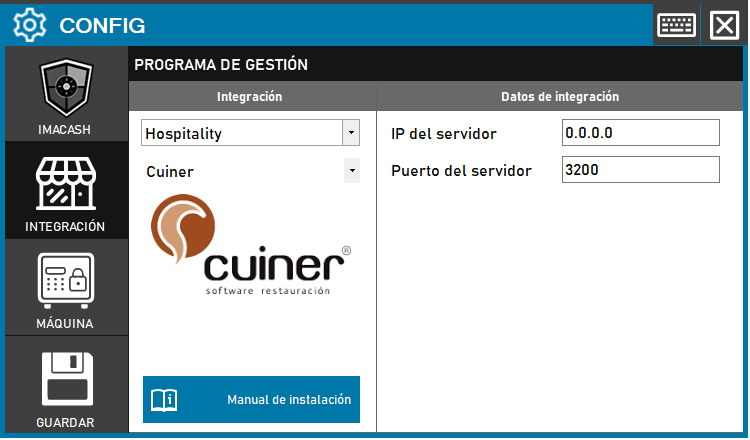
Cuiner configuration
To integrate Cuiner with ImaCash, the technician must specify the IP address of the server where the Cuiner software is installed. The remaining connection parameters, such as the port, are usually the default values.
Steps to follow
- Access the integration settings:
- Go to CONFIG → INTEGRATION in your ImaCash system.
- Select the POS system:
- Select the POS category, in this case "Hospitality".
- Then select Cuiner from the drop-down menu.
- Complete the connection information:
- Server IP: Enter the IP address of the server where Cuiner is installed (example: 0.0.0.0 if local or the corresponding network IP).
- Server port: Indicates the connection port. This data is usually the default (example: 3200).
- Save the configuration:
- Click the SAVE button (disk icon) at the bottom left.
Note: The technician must fill in the “IP of the server” on which CUINER is installed. The other data is usually the default.