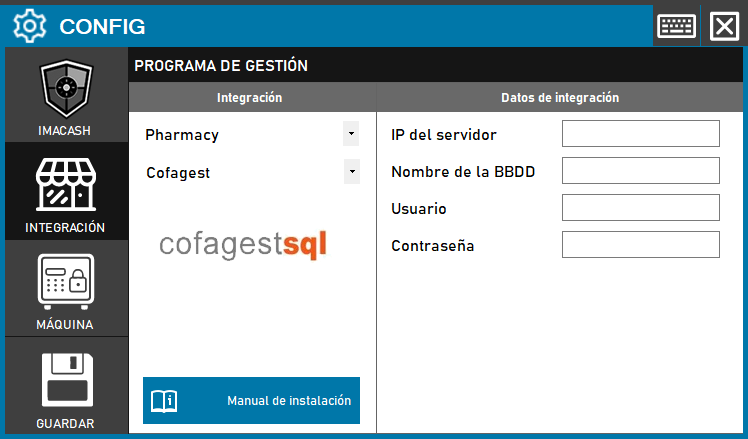
Cofagest configuration
Steps to follow:
1. Open the integration settings:
- Go to CONFIG → INTEGRATION in your ImaCash system
2. Select the POS system:
- Select the POS category, in this case «Pharmacy»
- A continuación, selecciona Cofagestdel menú desplegable
3. Complete the connection details:
- IP del servidor: Introduce la dirección IP del servidor donde está instalado Cofagest
- Nombre de la BBDD: Nombre de la base de datos de Cofagest
- User: User with access permissions to the database
- Contraseña: Private information provided by the administrator. Enter it only in ImaCash.
4. Save the configuration:
- Click the SAVE button (save icon) at the bottom left
⚠️ IMPORTANTE:
This integration will have an additional cost on top of the ImaCash license. The integration module license must be requested directly from COFAGEST.
Note: The technician must fill in the data where COFAGEST is installed: server IP, database name, user and password. Make sure to arrange the additional license before implementing this integration.