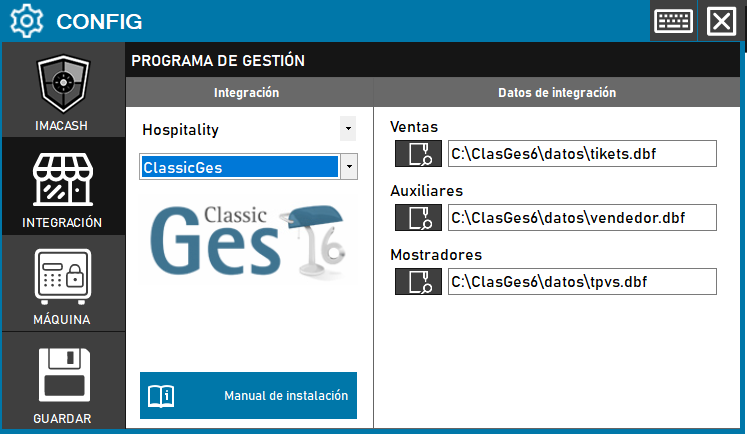
ClassicGes configuration
Steps to follow:
- Install the VFPOLEDB dependency: Before configuring the integration, the VFPOLEDB dependency must be installed
- You can download it from the ImaCash Cloud
- Open the integration settings: Go to CONFIG → INTEGRATION in your ImaCash system
- Select the POS system: Select the POS category, in this case “Hospitality”
- Then select ClassicGes from the drop-down menu
- Configure the table paths:
- Sales: Select tikets.dbf (example: C:\ClasGes6\datos\tikets.dbf).
- Invoices: Select factura.dbf. It is optional when the installation does not use paid invoices.
- Auxiliaries: Select vendedor.dbf to resolve operators.
- Counters: Select tpvs.dbf to resolve counters and stores.
- Save the configuration: Click the SAVE button (disk icon) in the lower-left corner
Important prerequisite:
Install 32-bit VFPOLEDB. For UNC paths, the Windows account running ImaCash must have stable read access to the folder. Keep every DBF together with its matching FPT file.
Note: Technicians must configure the following tables:
- Sales: tikets.dbf
- Invoices: factura.dbf (optional)
- Auxiliaries: vendedor.dbf
- Counters: tpvs.dbf