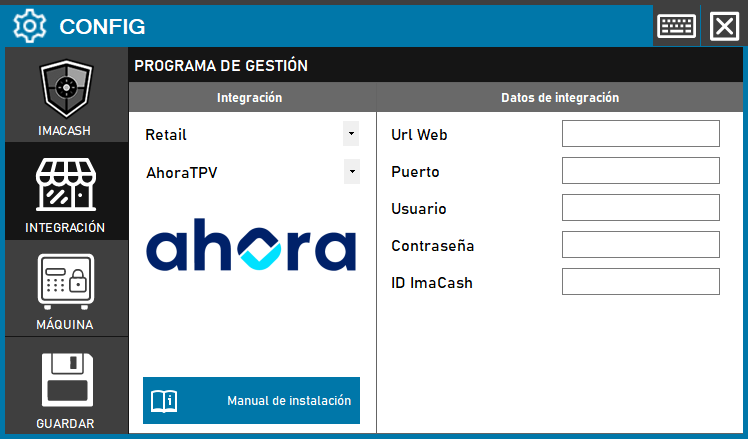
To integrate AhoraTPV with ImaCash, an active module from Ahora TPV is required to enable communication between systems. Once it is active, the technician must complete the connection details.
Steps to follow
1- Open the integration configuration:
- In ImaCash, open Configuration > Integration > AhoraTPV.
2- Select the POS system:
- Select the POS category, in this case Retail.
- Then select AhoraTPV from the dropdown menu
3- Complete the connection details:
- Web URL: enter the base URL with the service's exact protocol, http:// or https://, and the verified host. Do not include a port, trailing slash, /api/Imacash paths, parameters, username or password.
- Port: enter the service's actual port separately. Example: Web URL https://192.168.1.20 and Port 8443, only if this is the authorised HTTPS endpoint.
- User: an account authorised by AhoraTPV for the ImaCash module, with permission to query and confirm transactions.
- Password: Private information provided by the administrator. Enter it only in ImaCash.
- ImaCash ID: the identifier assigned to this installation in AhoraTPV. It corresponds to the internal Puestos field and must match the value configured in the AhoraTPV module.
4- Save the configuration:
- Click the Save button (disk icon) in the lower left corner
Prerequisite: AhoraTPV's ImaCash module must be enabled. Confirm the protocol, host, port, authorised account and ImaCash ID with its administrator before saving.
Configure the final URL and port provided by AhoraTPV. Use HTTPS when supported by the service and confirm the certificate for that installation with the administrator.