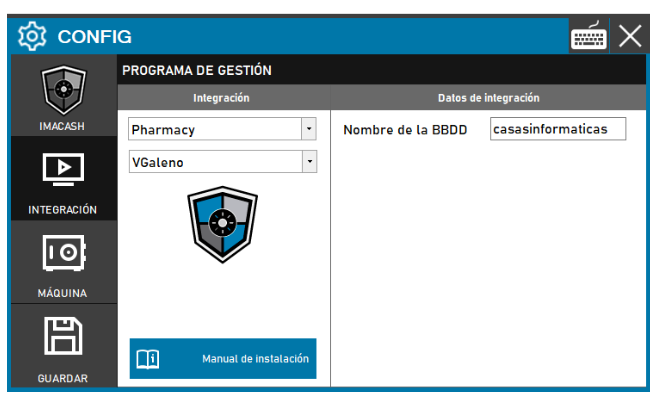
To integrate VGalen Software with ImaCash, it is necessary to perform advanced network and database configuration in the operating system, in addition to the configuration in the ImaCash interface.
Important Notice: This integration carries an additional cost over the standard ImaCash license.
1. System file configuration (Windows)
Before configuring the software, you must manually edit the following files in the path C:\Windows\System32\drivers\etc\:
- File
- File
- Note: The name "sserver" may vary; check with VGaleno support if it doesn't work.
2. Creating the ODBC data source
You must create an “IBM INFORMIX ODBC DRIVER”. If it is not installed, download the driver from the ImaCloud dependencies.
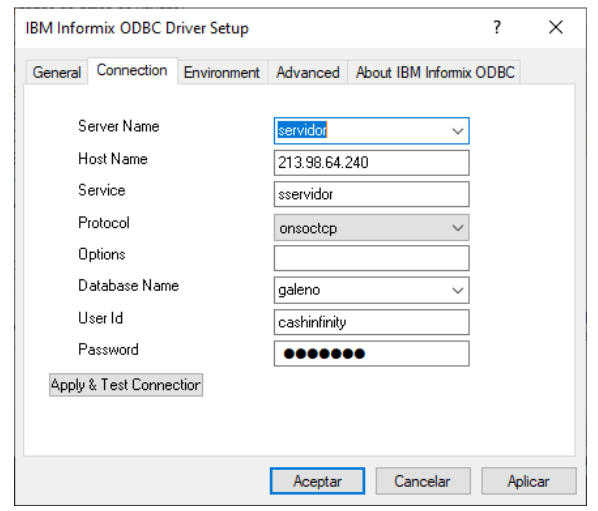
In the driver configuration window, complete the following fields:
- General Tab
- Data Source Name: Enter the name of the database.
- Connection Tab (Example)
- Server Name: server.
- Host Name: 213.98.64.240 (or the corresponding IP).
- Service: sserver.
- Protocol: onsoctcp.
- Database Name: doctor.
- User Id: cashinfinity.
- Password: Private information provided by the administrator. Enter it only in ImaCash.
Section only for Imagina technicians “Use DecEnc”
gc7GWjDni23X9ubEQy1oBYMSpEIp9BWRoSBABsE/c9JQ/DcLnULZG9kFaePpzo+nMvPwKIFXS/N30d2w4Jxxjw==
3. Configuration in ImaCash
Once ODBC is configured, access the ImaCash interface:
- Go to CONFIG → INTEGRATION.
- Select the Pharmacy category and integration VGaleno.
- Enter the name of the created ODBC and save the configuration.