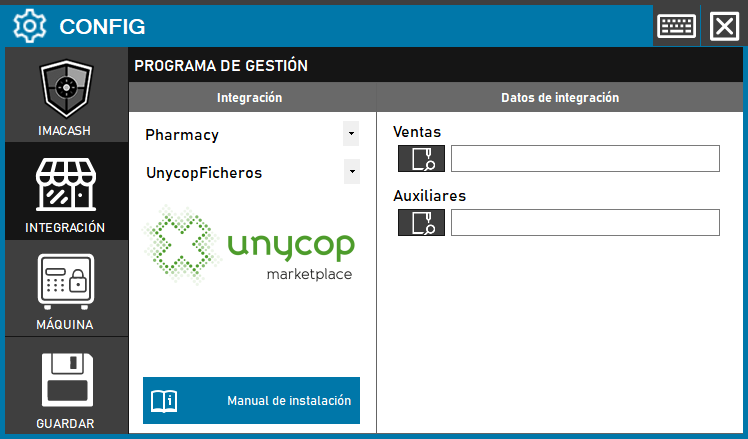
To integrate Unycop Software with ImaCash, the system uses a local file exchange that must be organized in a specific directory structure and shared on the network.
1. Preparation of Directories
It is necessary to carry out the following previous steps on the equipment:
- Crear una carpeta llamada ImaCash en la raíz del disco principal (ej.
- Inside the ImaCash folder, create two additional subfolders:
- Sales
- Auxiliary files
- Important: The root folder “ImaCash” must be shared with the necessary permissions so that the rest of the computers on the network have access to it.
2. Configuration in ImaCash
Once the folders are prepared, follow these steps in the interface:
- Access the menu CONFIG → INTEGRATION.
- In the Management Program section, select:
- Category: Pharmacy.
- Integration: UnycopFicheros.
- In the Integration Data section, specify the corresponding routes:
- Sales (Counters): Select the path of the “Sales” folder created previously.
- Auxiliaries (Sellers): Select the path of the “Auxiliaries” folder created previously.
- Click the SAVE button (disk icon).
Important:
Esta integración tendrá un coste adicional a la licencia de ImaCash.