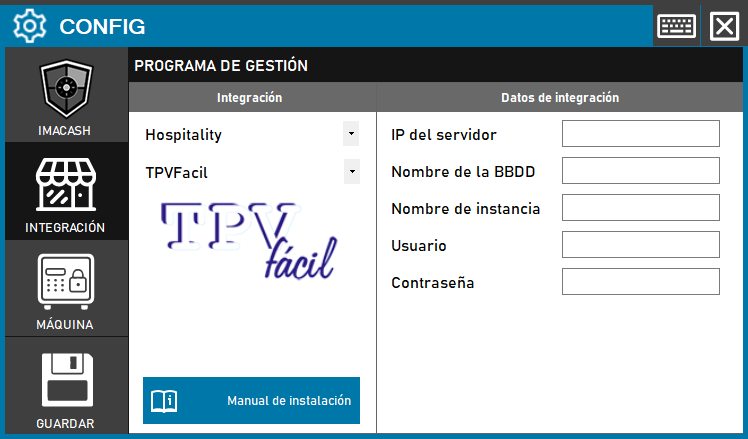
To integrate the Software TPV Fácil con ImaCash, el técnico debe configurar los parámetros de conexión para acceder a la base de datos del sistema de gestión.
Steps to follow:
- Access the CONFIG → INTEGRATION menu in the ImaCash interface.
- In the Management Program section, select the following values:
- Category: Hospitality.
- Integration: TPVFacil.
- In the Integration Data section, complete the technical information:
- Server IP: Enter the IP address where the database resides.
- Nombre de la BBDD: Especificar el nombre de la base de datos de TPV Fácil.
- Instance name: Indicate the name of the corresponding SQL instance.
- User: Username for the connection.
- Contraseña: Private information provided by the administrator. Enter it only in ImaCash.
- Click the SAVE button (floppy disk icon) to confirm the changes.