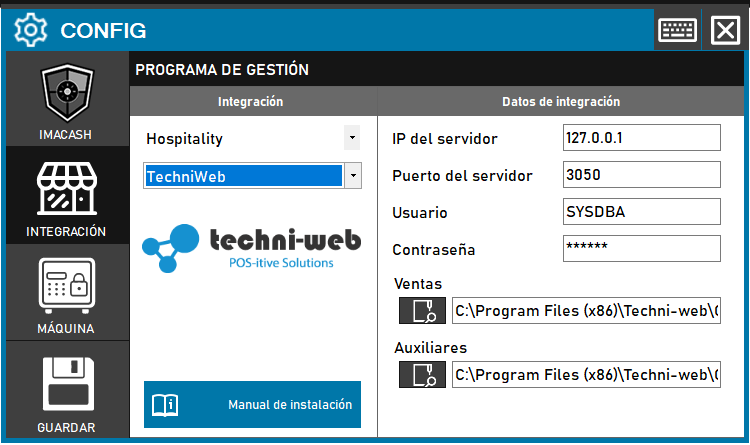
To integrate Techni-Web Software with ImaCash, it is essential to perform a prior installation of dependencies and correctly configure the Firebird database files for sales and collections management.
Techni-Web Integration Configuration with ImaCash
Prerequisite: Install the Firebird 1.5.6 dependency available from ImaCloud before starting the setup.
Required Action: Configure the connection to the server and map the GDB files corresponding to the company and general configuration.
Steps to follow:
- Go to CONFIG → INTEGRATION in ImaCash.
- In Management Program, select:
- Category: Hospitality.
- Integration: Techni-web.
- Under Integration Data, complete the network fields:
- Server IP: Enter the IP address of the terminal.
- Port: Enter the connection port.
- Contraseña: Private information provided by the administrator. Enter it only in ImaCash.
- Specify Firebird database paths:
- Ventas: Selecciona el archivo de la empresa (ej.
- Auxiliares: Selecciona el archivo general (ej.
- Click the SAVE button (disk icon).
[!IMPORTANT] Selección de tipos de pago: Al guardar, aparecerán cuadros de diálogo solicitando seleccionar el nombre del tipo de efectivo y del tipo de tarjeta. Es crítico seleccionarlos correctamente para asegurar el funcionamiento de la integración.