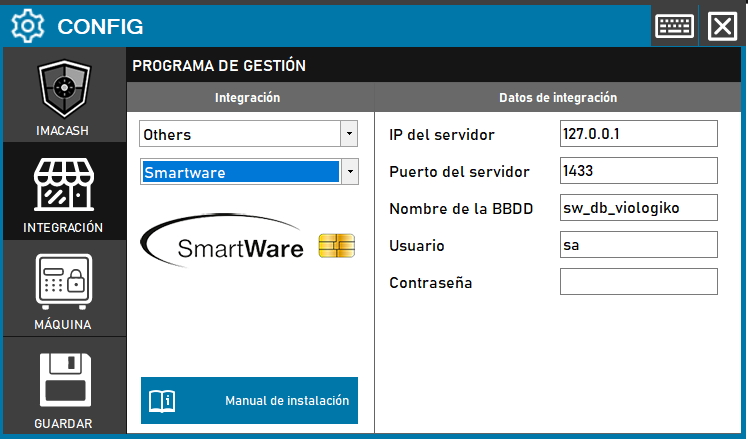
To integrate SmartWare Software with ImaCash, it is necessary that standard ImaCash databases be created to allow information exchange between systems.
Steps to follow:
- Access the CONFIG → INTEGRATION menu in the side interface of ImaCash.
- In the Management program section, select the following values:
- Category: Others.
- Integration: Smartware.
- In the Integration Data section, complete the technical information for the server:
- Server IP: Enter the network address (example: 127.0.0.1).
- Server port: indicate the communication port (example: 1433).
- Database name: specify the name of the database (example: sw_db_viologiko).
- User: name of the user with access permissions (example: sa).
- Contraseña: Private information provided by the administrator. Enter it only in ImaCash.
- Click the SAVE button (floppy disk icon) to register the settings.