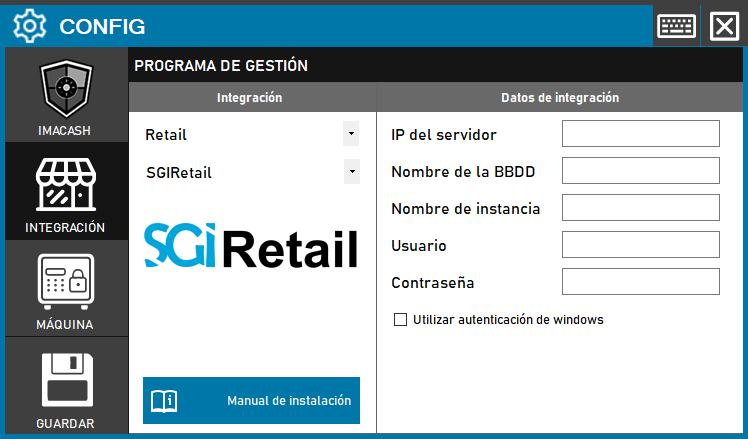
To integrate the SGI Retail Software with ImaCash, the technician must configure the connection parameters to the server where the management program database is hosted.
To integrate SGI Retail software with ImaCash, the technician must establish the connection with the database server to synchronize sales operations with cash flow.
SGI Retail integration configuration with ImaCash
Action required: The technician will need to complete the network parameters and security credentials within the configuration panel to enable communication between both systems.
Steps to follow:
- Access the CONFIG → INTEGRATION menu in the side interface of ImaCash.
- In the Management program section, select the following values:
- Category: Retail.
- Integration: SGIRetail.
- In the Integration Data section, fill in the technical information for the server:
- Server IP: Enter the network address of the computer where the database is hosted.
- Name of the BBDD: indicate the name of the corresponding database.
- Instance Name: Specify the database instance if necessary.
- User: name of the user with access permissions.
- Contraseña: Private information provided by the administrator. Enter it only in ImaCash.
- Use Windows Authentication: Check this box if access to the server is managed using operating system credentials instead of a specific database user.
- Click the GUARDAR button (floppy disk icon) to apply the settings.