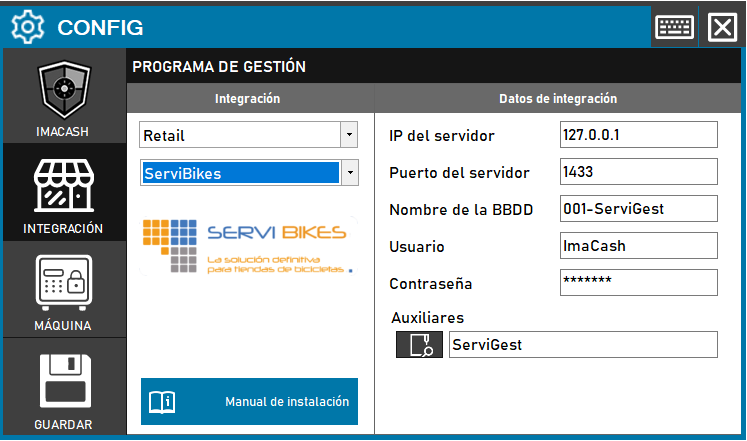
To integrate the ServiBikes Software with ImaCash, the technician must configure the connection parameters to the database server. Although the system offers default values, these can be edited to fit the specific customer installation.
Steps to follow
Action Required: The technician will need to enter network credentials and select the ancillary data path to enable inter-system communication.
Steps to follow:
- Open CONFIG → INTEGRATION from the ImaCash side panel.
- In the Management program section, select the following values:
- Category: Retail.
- Integration: ServiBikes.
- In the Integration Data section, complete the technical information for the server:
- Server IP: Enter the network address (example: 127.0.0.1).
- Server port: indicate the communication port (example: 1433).
- Database name: specify the name of the database (example: 001-ServiGest).
- User: name of the user with permissions (example: ImaCash).
- Contraseña: Private information provided by the administrator. Enter it only in ImaCash.
- In the Auxiliary field, use the magnifying glass icon to define the path of the ServiGest files.
- Click the SAVE button (floppy disk icon) to apply the changes.
Technical note: For the User and Password fields, it is necessary to previously create them in the database using SQL Server Management Studio, unless the original installation credentials are already available.