
ImaCash integration

SchultesFicheros

Practical guide to integrate SchultesFicheros with ImaCash, review requirements and accelerate implementation.

SchultesFicheros
Hospitality

Used in installations where the Schultes software exports sales information to a specific directory for ImaCash to process.

Steps to follow:

  1. CONFIG → INTEGRATION in ImaCash.
  2. Management Program:
    • Category: Hospitality.
    • Integration: Schultes Files.
  3. Integration data:
    • Sales: Click the folder icon and select the exchange directory path.
  4. Save: Click the SAVE button (floppy disk icon).
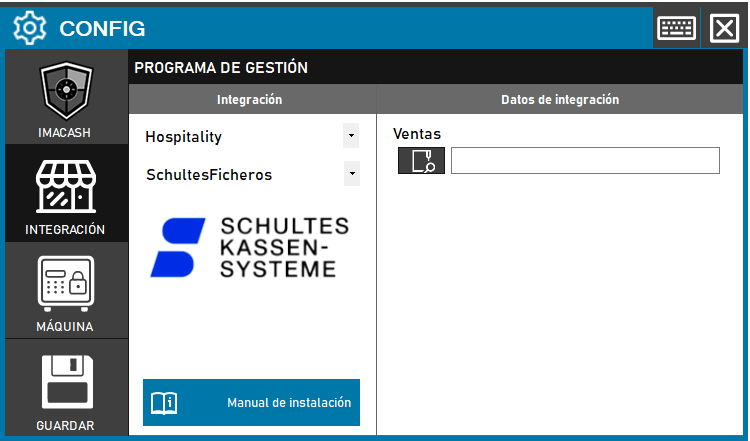
SchultesFicheros configuration screenshots

Integration ready to move forward

If this integration matches your software, the next step is moving into real operation

We can help you validate the scope, confirm compatible hardware and prepare the next implementation step.