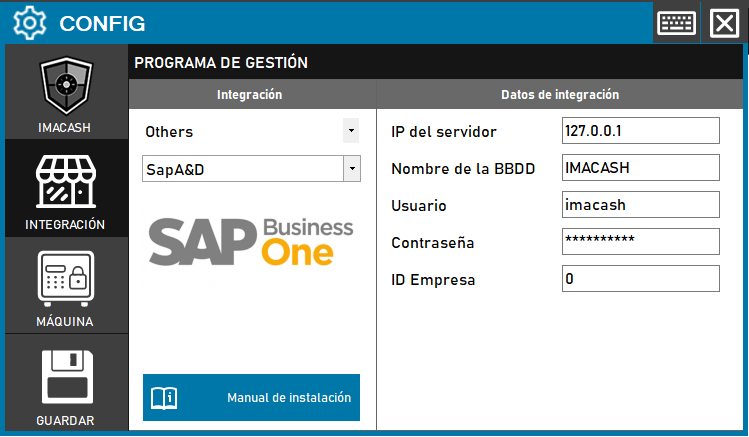
Specific version for clients who use SAP's vertical solution for the Textile and Footwear sector.
Action required: the technician must enter the network parameters of the SQL server and the company identification code to enable communication between systems.
Steps to follow:
- Access the CONFIG → INTEGRATION menu in the side interface of ImaCash.
- In the Management program section, select the following values:
- Category: Others.
- Integration: SapA&D.
- In the Integration Data section, fill out the required technical information:
- Server IP: Enter the network address (example: 127.0.0.1).
- Database name: specify the name of the company or database (example: IMACASH).
- User: name of the user with access permissions (example: imacash).
- Contraseña: Private information provided by the administrator. Enter it only in ImaCash.
- Company ID: enter the numerical identifier of the company (example: 0).
- Press the GUARDAR button (floppy disk icon) to confirm the changes.