

What is the ImaCash REST API?
The REST API is the bridge that connects your POS system to ImaCash and cash control devices. It works with simple HTTP requests in JSON format, and all access is token protected to maintain security.
When to use this integration?
This API is intended for when your POS cannot connect directly with ImaCash due to differences in platform, architecture or technology. Instead of modifying your system, you use our API to communicate.
What are the requirements to integrate a POS to the ImaCash Rest API?
Validate that your software meets the technical standards necessary to seamlessly integrate with ImaCash using the API REST. There are only 6 requirements, check them out here.
Important
For direct physical operations with the machine (such as manual counting, emptying or maintenance), you will have to work with the ImaCash interface directly. The API manages data communication, not physical control of the hardware.
Settings
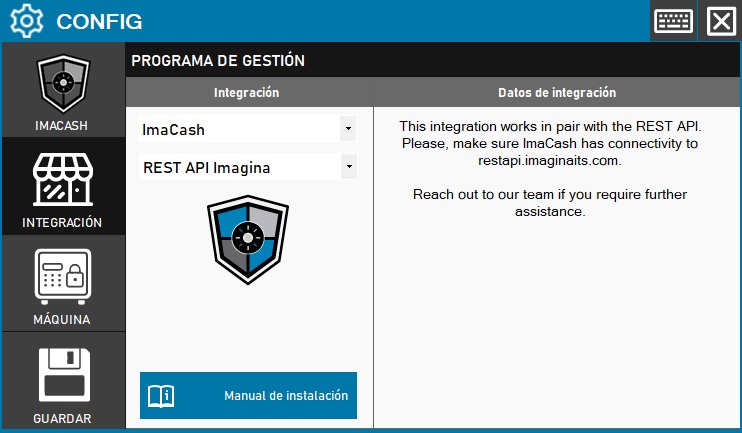
IMPORTANT NOTE: Para que el POS pueda vincularse a ImaCash mediante la REST API de Imagina, necesitarás un token de autenticación que deberás solicitar a nuestro equipo.
POS Communication Flow - ImaCash using REST API
The following image illustrates how the communication between the POS system and ImaCash works through the REST API:
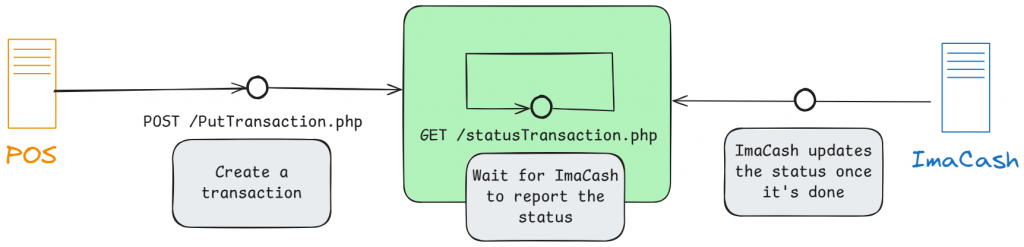
- The POS creates a transaction using POST /PutTransaction.php
- ImaCash waits and processes the transaction using GET /statusTransaction.php
- ImaCash updates the status after the process is completed
- The POS receives confirmation of the transaction status
Para más información sobre la implementación técnica y documentación completa de la API pulsa a continuación:
Review all the complete documentation here