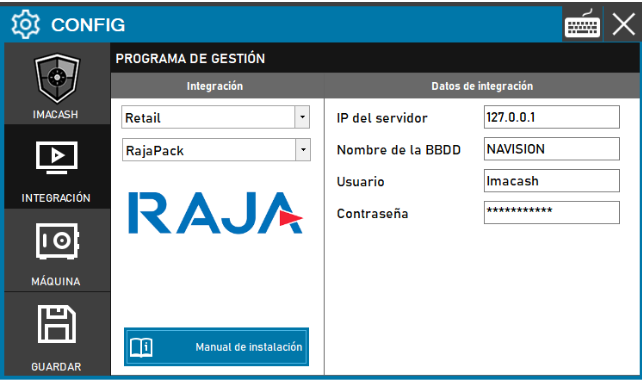
In the integration with RajaPack, ImaCash records sales through barcodes passed directly to it. The configured data corresponds to the database where ImaCash will store said information once processed.
Steps to follow
- CONFIG → INTEGRATION in ImaCash.
- Management Program:
- Category: Retail.
- Integration: RajaPack.
- Integration data:
- Server IP: Enter the IP address of the server where the DB is hosted.
- Database name: Enter the name (generally it is fixed, e.g. NAVISION).
- User: Enter the provided credentials (e.g. ImaCash).
- Contraseña: Private information provided by the administrator. Enter it only in ImaCash.
- Save: Click the SAVE button (floppy disk icon).