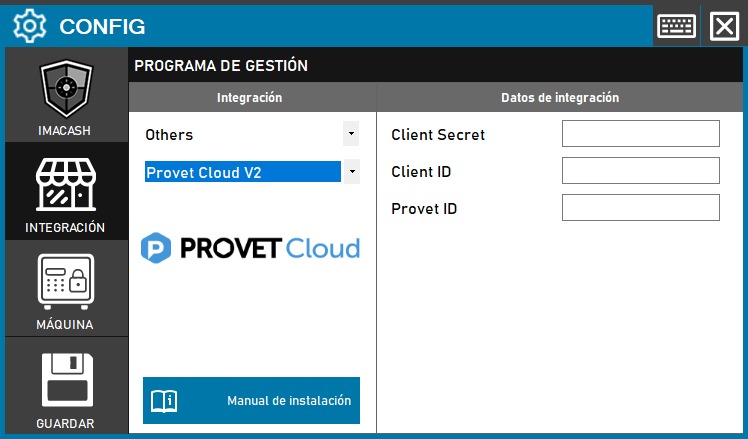
Due to structural changes in the provider's platform, all users of P rovet Cloud will have to migrate to this V2 version soon. For configuration, it is essential to have the new API credentials provided by the provider.
Steps to follow:
- CONFIG → INTEGRATION in ImaCash.
- Management Program:
- Category: Others.
- Integration: Provet Cloud V2.
- Integration data:
- Client Secret: Enter the secret code obtained from Provet Cloud.
- Client ID: Enter the corresponding client identifier.
- Provet ID: Enter the username used on the Provet Cloud website.
- Save: Click the SAVE button (floppy disk icon).
Important note: This version will replace the previous one on a mandatory basis for all users due to security updates to the management software itself.