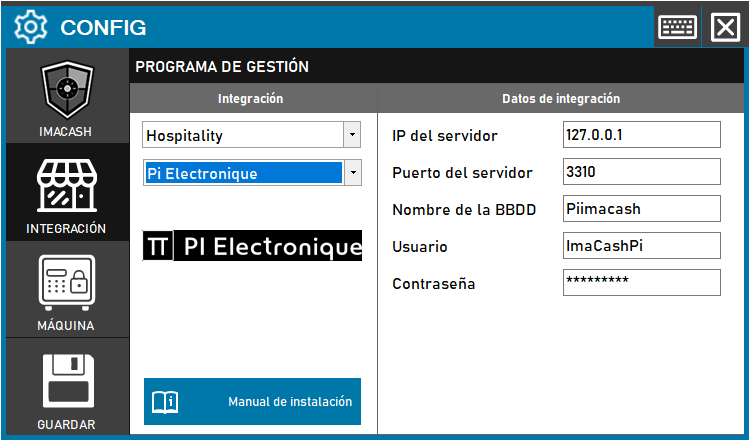
To integrate the Pi Electronique Software with ImaCash, PI ELECTRONIQUE technicians must previously create the database on port 3310 of ImaCash. Once created, the connection data (IP, Port, Username and Password) must be entered in the configuration panel.
Steps to follow
- CONFIG → INTEGRATION in ImaCash.
- Management Program:
- Category: Hospitality.
- Integration: Pi Electronique.
- Integration data:
- Server IP: Enter the IP address (e.g. 127.0.0.1).
- Server port: Enter port 3310.
- Database Name: Enter the name of the database (e.g. Piimacash).
- User: Enter the assigned user (e.g. ImaCashPi).
- Contraseña: Private information provided by the administrator. Enter it only in ImaCash.
- Save: Click the SAVE button (floppy disk icon).