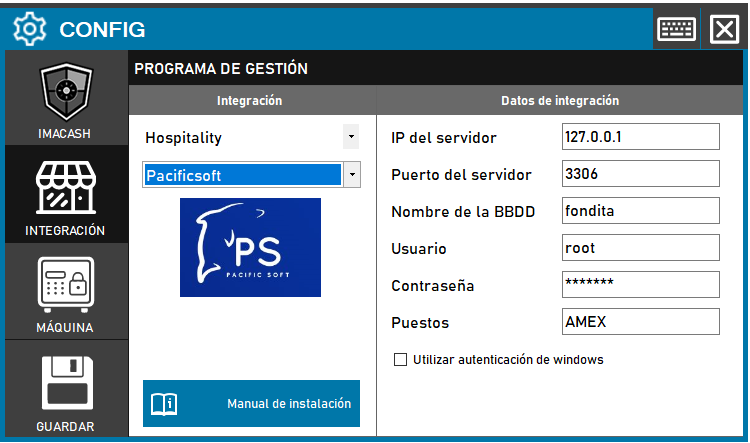
To integrate the Software Pacific Soft con ImaCash, el técnico deberá configurar los parámetros de conexión al servidor MySQL, incluyendo la IP, el Puerto, el Nombre de la BBDD y las credenciales de acceso.
Steps to follow:
- CONFIG → INTEGRATION in ImaCash.
- Management Program:
- Category: Hospitality.
- Integración: Pacificsoft.
- Integration data:
- IP del servidor: Introducir la dirección IP (ej. Private information provided by the administrator. Enter it only in ImaCash.).
- Server port: Enter the corresponding port (e.g. 3306).
- Database Name: Enter the name of the database (e.g. fondita).
- User: Enter the access user (e.g. root).
- Contraseña: Private information provided by the administrator. Enter it only in ImaCash.
- Puestos: Especificar el nombre del terminal o caja (ej. AMEX).
- Use Windows Authentication: Check this box only if this validation method is required.
- Save: Click the SAVE button (floppy disk icon).